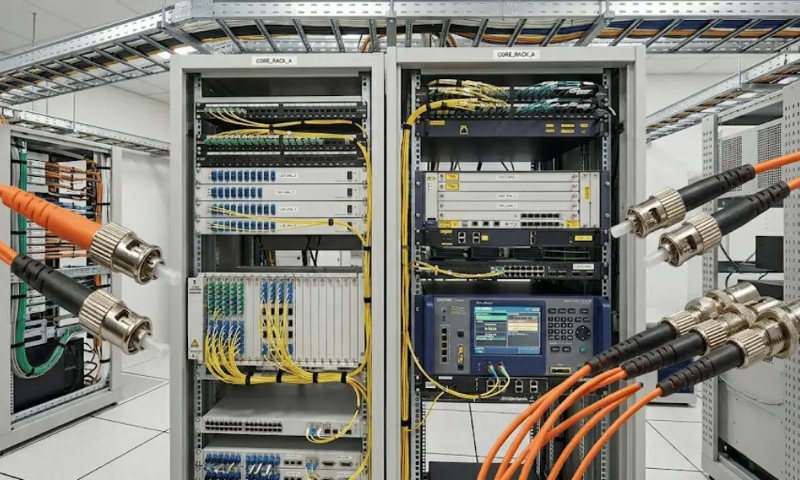
An optical distribution frame (ODF) serves as the centralized fiber management unit in structured cabling systems. It handles fiber termination, splicing, routing, protection, and cross-connection - all within a single enclosure. Whether you are building out a telecom central office, equipping a data center, deploying an FTTH access network, or upgrading an enterprise backbone, the ODF is where incoming fiber cables transition into organized, maintainable connections.
This guide covers what an ODF is, how it works, what components it contains, the main types available, where it is used, how it compares to a fiber patch panel, and how to choose the right one for your project.

What Is an Optical Distribution Frame (ODF)?
An optical distribution frame is a passive fiber management enclosure designed to provide a structured interface between outside plant (OSP) fiber cables, backbone fiber, and internal network equipment. It consolidates several critical functions: cable entry and anchoring, fiber splicing or termination, adapter-based patching, routing and bend-radius management, and physical protection of fiber connections.
Unlike a simple patch panel that only presents connectorized ports, an ODF is built to manage the full lifecycle of a fiber link - from the moment the cable jacket is stripped and strength members are secured, through splicing or termination, all the way to the patch cord connection that links to active equipment or downstream distribution.
In structured cabling frameworks such as ANSI/TIA-568 and BICSI installation standards, the ODF occupies a defined location in the cabling hierarchy - typically at the entrance facility, equipment room, or main distribution area - where it serves as the primary management point for optical fiber infrastructure.
Key Components Inside an ODF
Understanding what goes into an ODF helps explain why it performs differently from a basic patch panel. A typical ODF includes the following functional components:
Cable entry and fixing hardware.
The incoming cable is anchored at the frame so that the jacket, strength members (aramid yarn or steel), and buffer tubes are mechanically secured. This prevents external pulling forces from reaching the individual fibers inside.
Splice trays.
These hold and protect fusion splices or mechanical splices where incoming fibers are joined to fiber pigtails. Each tray typically manages 12 or 24 splices and maintains the minimum bend radius required by the fiber manufacturer.
Adapter panels.
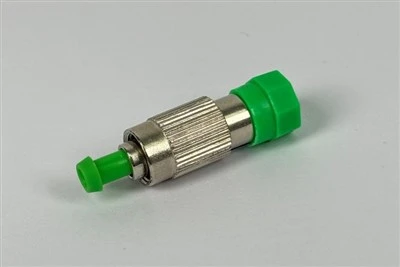
Adapters - also called couplers - are the mating interface where pigtails meet patch cords. The adapter type (LC, SC, FC, ST) determines port density and compatibility with existing equipment. Fiber optic adapters are mounted on panels that slide or swing out for maintenance access.
Fiber routing guides and troughs.
Internal routing channels direct fibers from the splice area to the adapter panel while maintaining proper bend radius and separation between incoming and outgoing fiber paths.
Slack storage area.
Excess fiber length is coiled and stored inside the frame. This reserve is critical for future re-splicing, connector replacement, or rerouting without pulling new cable.
In real deployments, the splice tray layout and routing path design often matter more than raw port count. An ODF with clean internal routing and easy tray access will save hours of maintenance time over its service life compared to a cheaper unit with cramped internal space.
How Does an ODF Work in a Fiber Network?
An ODF sits at a transition point - typically where an outside plant cable or backbone cable enters a building, floor, or equipment area and needs to be converted into manageable, patchable connections.
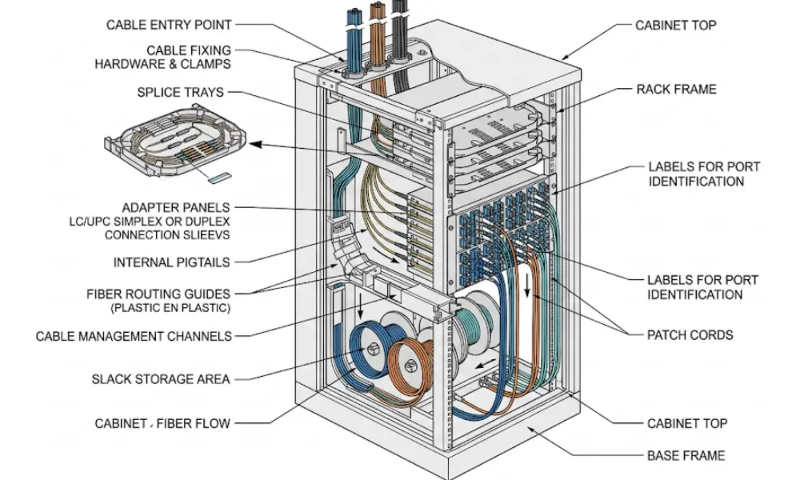
The working process follows a logical sequence. First, the incoming fiber cable enters through a sealed port at the bottom or rear of the frame and is clamped to the cable fixing bracket. The cable jacket is stripped back, and individual fiber tubes are routed to splice trays. Inside each tray, bare fibers are fusion spliced to pigtails - short lengths of fiber pre-terminated with a fiber optic connector on one end. The connectorized ends of those pigtails are routed through internal channels and plugged into adapters mounted on the front panel. From the other side of those adapters, patch cords connect to active equipment, another distribution frame, or a downstream terminal box.
This arrangement gives technicians a single, organized location to perform cross-connections, test individual fibers, isolate faults, and reconfigure links - without disturbing the permanent cable plant. In many installations, the ODF is the last point where backbone fiber is physically managed before signals reach switches, routers, or optical line terminals.
Common Types of Optical Distribution Frames
ODFs are classified primarily by mounting method, which in turn determines their physical size, fiber capacity, and intended deployment environment. The three main types are wall-mount, rack-mount, and floor-standing.

Wall-Mount ODF
A wall-mount ODF is a compact enclosure fixed directly to a wall surface. It is designed for locations where rack space is not available or where fiber counts are relatively low - typically up to 24 or 48 fibers.
Wall-mount units are common in small telecom rooms, corridor distribution points, residential building risers, and light FTTH distribution scenarios. They work well when the installation site has limited floor space but adequate wall area. The trade-off is that rear access is restricted once the unit is mounted, so cable entry direction and tray orientation need to be planned before installation. In retrofit projects, wall space and rear clearance often become bigger constraints than fiber count.
Rack-Mount ODF
A rack-mount ODF installs into a standard 19-inch equipment rack, the same type used for switches, servers, and patch panels. It is available in various heights - commonly 1U, 2U, or 4U - and supports modular adapter panels that can be swapped or upgraded.
This type is the most widely used in enterprise networks, data center cabinets, and structured cabling deployments. Its main advantage is integration: it shares rack space with other network hardware, simplifies cable routing between the ODF and active equipment, and supports incremental capacity expansion by adding modules. Rack-mount ODFs are a practical choice for projects in the range of 12 to 144 fibers per unit, though high-density versions can support more. For many projects, the decision between rack-mount and floor-standing comes down to whether the fiber transition happens inside an existing cabinet or in a dedicated distribution room.
Floor-Standing ODF
A floor-standing ODF is a free-standing cabinet, often 600 mm to 800 mm wide, designed for high-capacity fiber management. These units can handle hundreds or even over a thousand fibers and are common in telecom central offices, carrier co-location rooms, and large-scale backbone aggregation points.
Floor-standing frames offer the most internal space for splice trays, routing channels, and slack storage. They typically provide both front and rear access, which is essential when technicians need to work on cable entries and adapter panels simultaneously. The disadvantage is footprint - they require dedicated floor space, proper ventilation, and usually overhead or underfloor cable entry paths.
ODF Type Comparison
| Feature | Wall-Mount ODF | Rack-Mount ODF | Floor-Standing ODF |
|---|---|---|---|
| Typical fiber capacity | 12–48 fibers | 12–144+ fibers | 144–1,000+ fibers |
| Mounting | Wall surface | 19-inch rack | Free-standing on floor |
| Best environment | Small rooms, corridors, building risers | Enterprise racks, data center cabinets | Central offices, carrier rooms, backbone hubs |
| Rear access | Limited after mounting | Depends on rack depth and layout | Full front and rear access |
| Expansion | Limited | Modular (add panels) | High (multiple sub-frames) |
| Space requirement | Minimal wall area | Shared rack space | Dedicated floor footprint |
Where Are ODFs Used?
ODFs appear wherever fiber cables need structured termination, physical protection, and organized cross-connection. The specific deployment varies by network layer.

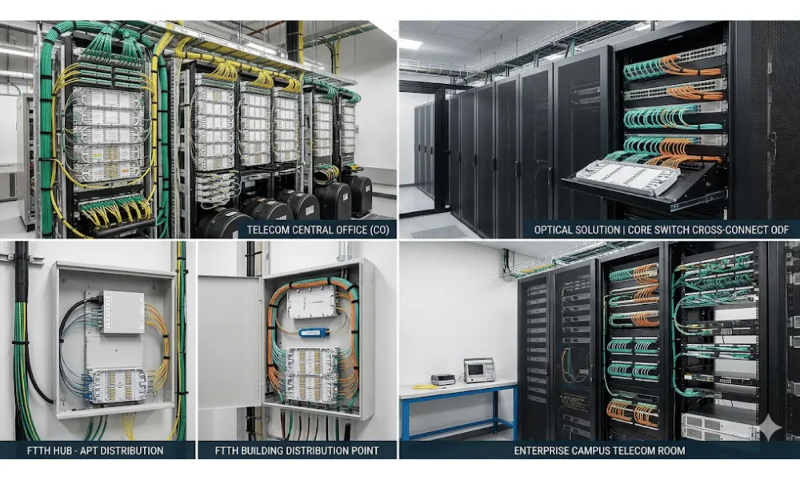
Telecom Central Offices and Carrier Rooms
In telecom environments, ODFs manage large volumes of incoming trunk and feeder fibers. They provide the structured termination point where outside plant fiber meets internal switching and transmission equipment. Floor-standing ODFs dominate these sites because fiber counts can easily exceed several hundred cores, and centralized management of splicing, patching, and fault isolation is essential.
Data Centers and Server Rooms
Data center fiber infrastructure relies on ODFs to organize backbone links between rooms, halls, or buildings, and to manage interconnections between cabinets. Clean fiber routing, high port density, and fast maintenance access are priorities. Rack-mount ODFs are the standard choice because they fit into the same cabinet ecosystem as switches and servers. In high-density environments, choosing adapters that maximize port count per rack unit - such as LC duplex connectors or MPO/MTP connectors - directly affects how many fibers fit within each frame.
FTTH and Access Networks
In fiber-to-the-home deployments, ODFs are used at the optical line terminal (OLT) side and at building-level distribution points. They terminate feeder cables from the central office and distribute fibers to PLC splitters or directly to subscriber drop cables. Wall-mount or small rack-mount ODFs are common at building entry points, while fiber optic terminal boxes handle the last-meter distribution to individual units. Proper ODF selection at the FTTH distribution stage simplifies subscriber activation and reduces truck rolls for maintenance.
Enterprise and Campus Backbone Links
In office buildings, university campuses, and industrial facilities, ODFs manage the backbone fiber that connects building entrance facilities to floor-level or zone-level distribution points. These deployments typically use rack-mount ODFs in telecommunications rooms on each floor, with the incoming campus fiber spliced to pigtails and patched to horizontal distribution equipment.
ODF vs. Fiber Patch Panel: What Is the Difference?
This is one of the most searched questions in fiber infrastructure planning, and the confusion is understandable - both devices present rows of fiber adapters on a front panel. The difference lies in what happens behind that panel. A detailed comparison is covered in ODF vs. Patch Panel: Differences in Fiber Optic Networks, but here is the practical summary.
| Aspect | Optical Distribution Frame (ODF) | Fiber Patch Panel |
|---|---|---|
| Primary function | Splicing, termination, protection, and distribution | Connectorized patching and organization |
| Cable entry management | Full fixing bracket and strength member anchoring | Basic cable entry, may lack full anchoring |
| Splice capacity | Integrated splice trays for fusion or mechanical splices | Often none or minimal |
| Slack storage | Dedicated internal slack area | Limited or external |
| Typical location | Entrance facility, backbone transition, central office | Equipment-side, cabinet-level patching |
| Fiber capacity | Medium to very high | Low to medium |
In many structured cabling installations, both are used together. The ODF handles the backbone entry - where outside plant cable is spliced, protected, and distributed - while patch panels handle the equipment-side connections where pre-terminated patch cords link to switches and transceivers.
Quick decision guide: If your project involves incoming un-terminated cable that needs splicing and physical protection, you need an ODF. If the fiber is already connectorized and you only need a neat patching interface, a patch panel is sufficient. If both conditions exist in the same site, use both - one at the backbone side, one at the equipment side.
How to Choose the Right ODF
Selecting an ODF is not just about picking the right port count. The decision involves several interrelated factors, and overlooking any one of them can create installation problems or costly replacements later.

1. Current and Planned Fiber Count
Start with the number of fiber cores you need to terminate today, then add capacity for planned growth. A common guideline is to provision 30–50% additional capacity beyond current requirements. For example, if a building backbone needs 48 fibers now, selecting an ODF that supports 72 fibers avoids replacing the entire frame when a second cable run is added.
2. Connector and Adapter Type
The adapter interface must match the connector type used in your network. LC connectors are the most common choice for high-density single-mode and multimode applications because their small form factor allows more ports per panel. SC connectors remain widely used in FTTH and older structured cabling. FC connectors appear in some telecom and test environments, while ST connectors are found in legacy installations. Confirming adapter compatibility before procurement prevents field rework. The polish type - PC, UPC, or APC - also matters, especially in PON and CATV networks where APC connectors are required to minimize back-reflection.
3. Mounting Method and Available Space
The physical environment usually narrows the choice before any other factor does. Measure the available wall area, rack units, or floor space first. In many cases, the mounting decision is straightforward: if you have a 19-inch rack, use a rack-mount ODF; if you have only wall space, use a wall-mount; if fiber counts exceed what rack-mount units can handle, consider a floor-standing unit. Also check cable entry direction - top, bottom, or side - and confirm there is enough clearance for cable bending and technician access.
4. Splice Tray Capacity and Access
Each splice tray must accommodate the number of fibers in the cable being terminated. Standard trays hold 12 or 24 splices. Ensure the ODF has enough tray slots for all cable entries, and verify that trays can be accessed independently - pulling out one tray should not disturb adjacent splices. In maintenance-heavy environments, swing-out or sliding tray designs save significant time compared to fixed trays.
5. Protection and Cable Management Quality
Look beyond port count. Check for proper cable fixing brackets, bend-radius-compliant routing channels, fiber separation between incoming and outgoing paths, and adequate slack storage space. The fiber optic cable installation process is easier and more reliable when the ODF provides built-in management for every stage of the fiber path.
6. Maintenance and Expansion Considerations
Ask whether the ODF supports modular adapter panels so you can change connector types or add ports without replacing the frame. Front and rear access is important in high-density installations - if technicians cannot reach connectors and splice trays easily, every move, add, or change becomes slower and riskier. A well-designed ODF pays for itself in reduced labor during the operational phase.
Common Mistakes in ODF Selection
Several recurring errors lead to avoidable rework or early replacement.
Buying on price alone. A lower-cost ODF may use thinner gauge steel, have tighter internal routing, or lack proper splice tray guides. These savings often cost more in installation labor and future maintenance.
Ignoring future growth. An ODF that exactly matches today's fiber count offers no room for expansion. When a second cable or additional subscriber connections are needed, the entire unit may need replacement - a far more expensive outcome than provisioning spare capacity upfront.
Underestimating maintenance access. High port density is attractive on paper, but if a technician cannot clean a connector, replace a pigtail, or re-splice a fiber without disturbing adjacent connections, the density becomes a liability. Always verify that the tray access, adapter spacing, and internal clearance are workable under real conditions.
Confusing an ODF with a basic patch panel. If your project requires cable anchoring, splice management, and backbone-level protection, a connectorized-only patch panel will not meet those needs. This confusion is especially common in FTTH passive component procurement, where the roles of ODFs, splice closures, and patch panels are sometimes conflated in product listings.
Not checking connector polish compatibility. Mixing UPC and APC adapters, or using the wrong polish type for a PON deployment, introduces return loss problems that can degrade network performance. Confirm the polish standard for every adapter position before ordering. For more detail, see PC vs. UPC vs. APC polish types.
ODF Selection Scenarios

Scenario 1: Building Riser in an FTTH Project
A residential building needs fiber distributed from a ground-floor entry point to each floor. The feeder cable carries 24 fibers from the street-side splice closure. A wall-mount ODF with 24-fiber capacity is installed at the building entry. Incoming fibers are fusion spliced to SC pigtails, and patch cords connect through to floor-level distribution boxes. The wall-mount form factor works because the riser room has limited floor space, and the 24-fiber capacity matches the cable with moderate room for future re-splicing.
Scenario 2: Enterprise Data Center Cabinet
A data center needs to terminate a 48-fiber backbone cable in a standard 19-inch cabinet alongside network switches. A 2U or 4U rack-mount ODF with modular LC adapter panels handles the termination. The use of LC duplex adapters maximizes port density, and the modular design allows the operator to add panels later if the backbone is expanded. Choosing a rack-mount unit in this context keeps the fiber management co-located with active equipment, shortening patch cord runs and simplifying cable routing.
Scenario 3: Telecom Central Office Backbone Aggregation
A telecom operator manages 500+ fiber cores entering from multiple trunk cables at a central office. A floor-standing ODF with front and rear access handles the volume. Each trunk cable is routed to a dedicated sub-frame section with its own splice trays and adapter panels. The floor-standing form factor provides the tray capacity, routing space, and maintenance accessibility that this density demands. High-density MPO-to-LC breakout configurations may be used to accelerate patching in the most congested sections.
Frequently Asked Questions (FAQ)

What does ODF stand for in fiber optics?
ODF stands for Optical Distribution Frame. It is a passive fiber management device used to terminate, splice, organize, and distribute optical fibers in telecom, data center, FTTH, and enterprise network environments.
What is the difference between an ODF and a fiber patch panel?
An ODF provides full fiber lifecycle management - cable fixing, splicing, protection, routing, slack storage, and patching. A patch panel typically provides only connectorized patching. In many networks, the ODF sits at the backbone entry point and the patch panel sits at the equipment side.
How many fibers can an ODF support?
Capacity depends on the type. Wall-mount ODFs typically support 12–48 fibers. Rack-mount ODFs handle 12–144 or more fibers per unit. Floor-standing ODFs can manage several hundred to over a thousand fibers, depending on the frame size and adapter configuration.
Which connector types are used in an ODF?
The most common connector types are LC, SC, FC, and ST, with LC being the dominant choice in modern high-density deployments. The adapter panels in an ODF are usually modular, so you can select and swap connector types based on the specific network standard. For details on connector differences, see common fiber optic connector types.
Do I need an ODF for an FTTH deployment?
Yes, in most FTTH architectures. The ODF is used at the OLT side to terminate feeder fibers and distribute them to splitter stages or subscriber links. At the building level, smaller ODFs or terminal boxes manage the last-mile distribution.
What is the minimum bend radius inside an ODF?
The minimum bend radius for standard single-mode fiber (ITU-T G.652) is typically 30 mm under no-load conditions and 60 mm under tension, as specified by fiber manufacturers and referenced in standards such as ANSI/TIA-568.3. A well-designed ODF enforces this through curved routing guides and properly sized splice trays. Bend-insensitive fibers (ITU-T G.657) allow tighter radii, but internal ODF routing should still follow the fiber manufacturer's specifications.
Can I use both an ODF and a patch panel in the same network?
Yes, and this is a common design. The ODF handles the backbone termination and splice management at the cable entry point, while the patch panel provides flexible patching at the equipment side. This separation keeps the permanent cabling infrastructure (ODF) distinct from the frequently changed connections (patch panel), which improves long-term manageability.
Conclusion
An optical distribution frame is more than a housing for fiber adapters. It is the structured management point where raw fiber cable is converted into organized, maintainable, and expandable connections. Choosing the right ODF depends on fiber count, connector type, physical space, splice requirements, and long-term growth plans.
For projects that involve backbone fiber, un-terminated cable entries, or any scenario where splicing and physical protection are required, the ODF is the correct choice. For equipment-side patching with pre-connectorized fiber, a patch panel is often enough. Many networks benefit from using both.
Before finalizing your selection, map the ODF to the actual deployment environment: measure the space, count the fibers (current and planned), confirm connector and polish requirements, and verify that maintenance access will remain practical at full capacity. Getting these details right at the specification stage prevents rework after installation.