MTP connectors are the backbone of high-density fiber cabling in modern data centers. Yet the terminology around them - MPO vs MTP, male vs female, polarity Type A vs B vs C - confuses even experienced buyers and installers. Orders arrive with the wrong gender. Links pass physical inspection but fail logically because polarity was treated as an afterthought. Cassettes and breakout cables get mismatched to trunk designs.
This guide covers what an MTP connector actually is, how it differs from a generic MPO connector, the key connector types you need to understand, how polarity works in practice, where MTP connectors are used, and how to select the right one for a specific link design. It is written for procurement engineers, network designers, and installers who need to get MTP decisions right before deployment - not after.

What Is an MTP Connector?
An MTP connector is a multi-fiber push-on optical connector that terminates multiple fibers in a single ferrule. The name stands for Multi-fiber Termination Push-on. Where traditional duplex connectors like LC or SC handle one or two fibers per plug, an MTP connector can carry 8, 12, 16, 24, or even 32 fibers through a single interface.
This makes MTP connectors a practical choice wherever fiber density matters - backbone cabling between distribution areas, structured cabling in data halls, and parallel optical links supporting 40G, 100G, 400G, and 800G transmission. Instead of managing dozens of individual duplex patch cords, an installer can deploy a single MTP trunk assembly and break it out at each end as needed.
MTP vs MPO Connector: What Is the Difference?
This question comes up in nearly every MTP procurement conversation, and the distinction matters more than many buyers realize.
MPO (Multi-fiber Push On) is a generic connector format defined by international standards IEC 61754-7 and TIA-604-5 (also known as FOCIS 5). Any manufacturer can produce an MPO connector as long as it meets these interface specifications.
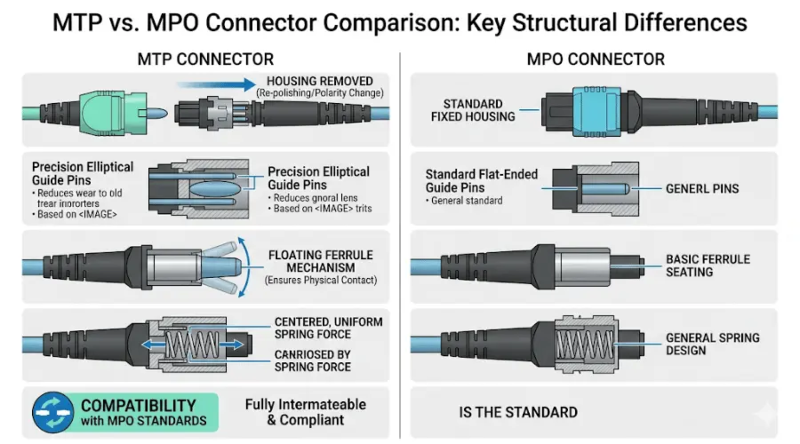
MTP is a branded, high-performance version of the MPO connector, designed and manufactured by US Conec. According to US Conec's technical documentation, MTP connectors are fully compliant with all MPO standards (IEC 61754-7-1, IEC 61754-7-2, and TIA-604-5) and can intermate with any standard-compliant MPO plug. However, MTP connectors incorporate engineering improvements that generic MPO connectors typically lack - including a removable housing for field re-polarity, tighter-tolerance elliptical guide pins that reduce guide hole wear, ferrule float for better physical contact under load, and an optimized spring design that prevents fiber ribbon damage.
In practical terms: all MTP connectors are MPO-compatible, but not all MPO connectors deliver MTP-level performance. For short, low-loss-budget links in dense environments - especially those supporting 100G or 400G parallel optics - the tighter tolerances of an MTP connector can be the difference between a channel that passes certification and one that does not.
For a deeper comparison, see our MPO/MTP fiber guide.
MTP Connector Types Explained
Choosing the right MTP connector means understanding several structural features that directly affect compatibility and performance. Here are the most important ones.
MTP Male vs Female: What's the Difference?

MTP connectors come in male and female versions, and this is not just labeling - it determines whether two connectors can physically mate.
A male MTP connector includes alignment guide pins that protrude from the ferrule face. A female MTP connector has guide holes but no pins, designed to receive and align with the pins on the male side. A proper connection always pairs one male plug with one female plug. Two male connectors cannot mate directly - the pins will collide. Two female connectors cannot mate either, because there is nothing to maintain fiber alignment.
In most structured cabling systems, trunk cables use female connectors at both ends, and the MTP/MPO adapter in the patch panel uses a pinned (male) alignment interface. Active equipment ports (transceivers, line cards) are typically pinned as well, so patch cords connecting to them use female MTP plugs.
A common procurement mistake: ordering all-male or all-female assemblies without checking the mating interface at each end. In the field, this means a connector that physically will not seat, leading to reorders and project delays.
Key Up and Key Down Orientation
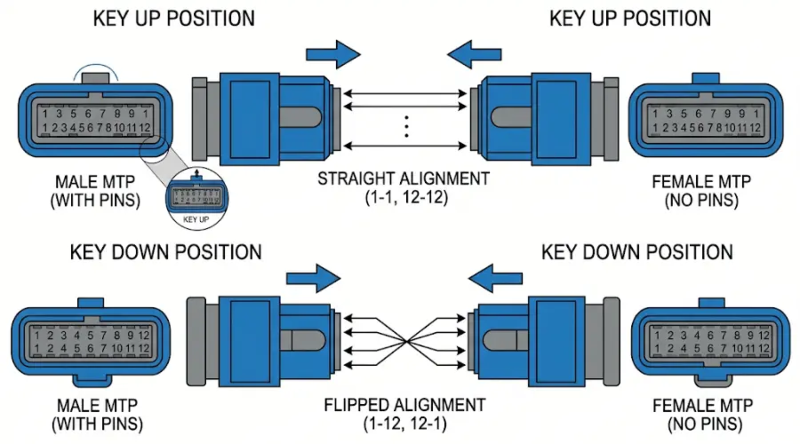
Every MTP connector has a raised key (a ridge on the housing) that controls its rotational position in the adapter. When two connectors mate through an adapter, their relative key orientation - key up to key up, or key up to key down - determines how fiber positions map from one end to the other.
Orientation is closely tied to polarity but is not the same thing. The key position affects which fiber position on one plug aligns with which position on the mating plug. Getting orientation wrong produces a link that is physically connected but optically misrouted.
UPC vs APC End Face Polish
MTP connectors are available with two end-face polish types:
- UPC (Ultra Physical Contact) - a flat, perpendicular polish that provides good return loss performance. This is the standard choice for most multimode data center applications and many single-mode links.
- APC (Angled Physical Contact) - an 8-degree angled polish that significantly reduces back reflection. APC is typically required in applications where return loss is critical, such as CATV, PON/FTTH, and certain long-haul or analog systems.
UPC and APC connectors are not interchangeable. Mating a UPC connector with an APC connector will damage both ferrule faces. Always verify the end-face type against the system design before ordering. For a detailed comparison of polish types, see our PC vs UPC vs APC guide.
MTP Connector Fiber Counts: 8, 12, 16, and 24 Fibers
Fiber count determines how many optical channels a single MTP connector carries. The right choice depends on the transceiver type, the breakout scheme, and the growth plan for the link - not just what happens to be in stock.

8-Fiber MTP Connectors
8-fiber MTP connectors are common in parallel optics applications where the transceiver uses four transmit and four receive fibers. This includes 40G SR4 (using QSFP+ modules) and some 100G SR4 configurations. If you are deploying 40G links over OM3 or OM4 multimode fiber, 8-fiber MTP assemblies paired with appropriate MTP-to-LC breakout cables are a standard approach.
12-Fiber MTP Connectors
12-fiber MTP connectors are the most widely deployed format in structured cabling. They serve as the base unit for most MTP trunk cables, cassette modules, and patch panels. Even in 8-fiber optics applications, 12-fiber trunks are often used because they provide spare fiber capacity for future migration. For 100G cabling, 12-fiber MTP assemblies remain a staple.
16-Fiber MTP Connectors
16-fiber MTP connectors are becoming more relevant as 400G and 800G optics enter production networks. Standards such as 400G SR8 and DR8 require eight transmit and eight receive lanes - a total of 16 active fibers. The IEC 61754-7-3 standard specifically defines the two-row, 16-fiber-wide MPO interface for these applications. Teams planning 400G parallel optics migration should evaluate whether their trunk and cassette infrastructure supports 16-fiber connectivity.
24-Fiber and Higher-Density MTP Connectors
24-fiber MTP assemblies pack more fibers into a single connection point, which reduces pathway usage and simplifies backbone deployment in large-scale environments. They are particularly useful in base-12 to base-24 conversion designs and in facilities where maximizing fiber density per rack unit is a priority. However, 24-fiber connectors require more attention to polarity planning, cleaning, and testing - with twice as many fiber end faces in one plug, contamination risk is correspondingly higher.
How MTP Connector Polarity Works (Type A vs B vs C)
Polarity is where most MTP cabling mistakes happen. It determines whether the transmit signal (Tx) at one end of a fiber link correctly reaches the receive port (Rx) at the other end. In a duplex LC connection, polarity is relatively simple - one fiber carries Tx, the other carries Rx. In an MTP system with 8, 12, or 24 fibers in a single connector, maintaining correct Tx-to-Rx mapping across every fiber pair through trunks, cassettes, and patch cords becomes a design-level concern.
Why Polarity Errors Happen
A polarity error does not prevent a physical connection. The connectors still seat, the link looks "normal," and basic continuity may even pass. But the optical paths are misrouted - transmitters connect to transmitters, or fiber positions are scrambled. The result is a link that is physically complete but logically broken. In a data center with hundreds or thousands of MTP connections, tracing a polarity error after the fact is time-consuming and expensive.
Type A, Type B, and Type C Polarity Methods
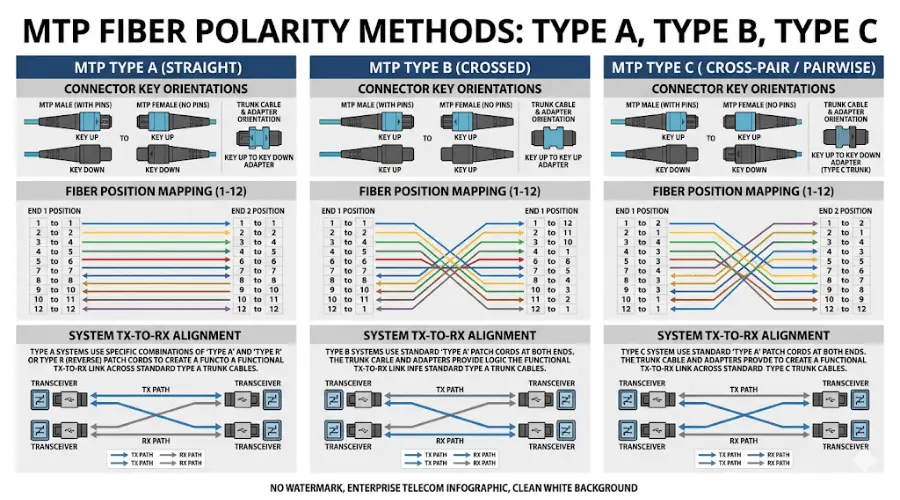
The ANSI/TIA-568.3-E standard defines three primary polarity methods for MPO/MTP systems, each using a different trunk cable type and adapter configuration:
- Type A (straight-through) - The trunk cable has a key-up connector on one end and a key-down connector on the other. Fiber at position 1 arrives at position 1 at the far end. Type A is the most common method in cassette-based structured cabling. It requires an A-to-B duplex jumper at one end and an A-to-A duplex jumper at the other, which means two different patch cord types must be stocked.
- Type B (reversed) - The trunk cable has key-up connectors on both ends, so the fiber sequence is reversed (position 1 maps to position 12). Type B is widely used in direct MPO-to-MPO parallel optics, such as 40G SR4 and 100G SR4. It uses standard A-to-B duplex jumpers on both ends, simplifying patch cord inventory.
- Type C (pair-wise flip) - Similar to Type A in key orientation (key up to key down), but each adjacent pair of fibers is swapped internally (position 1 goes to position 2, position 2 to position 1, and so on). Type C allows standard A-to-B duplex jumpers on both ends but uses a more complex cable design.
The TIA-568.3-E standard also introduced two newer universal methods, U1 and U2, which aim to simplify component commonality. However, the A/B/C methods remain dominant in current deployments.
The critical rule: Choose one polarity method and maintain it consistently across the entire installation. Mixing polarity types within the same link breaks Tx/Rx mapping and is one of the most common causes of unexplained link failures.
How to Avoid Polarity Mistakes
Define the full link architecture - from transceiver to transceiver - before ordering any components. That means documenting:
- Transceiver interface type and pinout
- Connector gender at each connection point
- Trunk cable polarity type (A, B, or C)
- Cassette or module type and internal mapping
- Breakout or harness cable configuration
- Duplex patch cord type (A-to-B or A-to-A)
When all of these are planned together, deployment is straightforward. When any one is left to "figure out in the field," the risk of a polarity mismatch rises sharply.
Where MTP Connectors Are Used

Data Centers and Cloud Infrastructure
MTP connectors are the standard multi-fiber interface in data centers built for scale. They enable rapid deployment of high-density fiber links between switches, servers, and storage - supporting the fast moves, adds, and changes that cloud and colocation environments demand. In spine-leaf architectures, MTP trunk cables form the backbone, with MTP cassette modules providing the transition to LC duplex ports at the equipment edge.
Backbone and Structured Cabling
In enterprise and campus networks, MTP assemblies simplify backbone fiber runs between telecommunications rooms, main distribution frames, and equipment cabinets. A single 12-fiber or 24-fiber MTP trunk replaces what would otherwise be six or twelve individual duplex runs, reducing cable tray congestion and installation time. For a practical comparison of MTP-based versus LC-based high-density cabling, see our LC vs MTP/MPO density guide.
High-Speed Migration: 40G, 100G, 400G, and Beyond
One of the strongest arguments for MTP infrastructure is migration readiness. A well-designed MTP trunk and cassette system can support 10G-to-40G, 40G-to-100G, and 100G-to-400G transitions with minimal physical layer changes - often just swapping the cassette module and transceiver while leaving the backbone trunk in place. For teams planning single-mode vs multimode decisions for future-speed support, the MTP connector is the common denominator across both fiber types.
How to Choose the Right MTP Connector
MTP selection is not a single decision - it is a series of linked choices that must align with the overall channel design. Here is a practical sequence.

Step 1: Match the Fiber Count to the Optics
Start with the transceiver. A 40G SR4 QSFP+ module uses 8 fibers (4 Tx + 4 Rx). A 100G SR4 QSFP28 also uses 8 fibers. A 400G SR8 QSFP-DD uses 16 fibers. Choosing the wrong fiber count means either wasting fibers or - worse - not having enough active fibers for the optics to function. If you are using 12-fiber trunks with 8-fiber optics, know which 4 fibers are dark and plan your cassette mapping accordingly.
Step 2: Verify Connector Gender at Every Point
Map out every connection in the link: transceiver port, patch cord, adapter panel, trunk cable end, cassette port. At each mating point, one side must be male (pinned) and the other must be female (unpinned). Ordering errors here are among the most common - and most costly - field mistakes in MTP deployments.
Step 3: Select and Lock the Polarity Method
Choose Type A, B, or C for the entire installation. Do not mix methods. Ensure that every component in the channel - trunk, cassette, adapter, patch cord - follows the same polarity scheme. Document it and communicate it to every team involved in installation.
Step 4: Choose Single Mode or Multimode
The fiber type must match the optics and application distance. Short-reach data center links (under 100 meters) typically use OM3 or OM4 multimode fiber. Longer-distance links, campus backbones, and front-haul/backhaul connections generally require single-mode fiber. This choice also affects the connector end face - single-mode links in certain applications may require APC polish.
Step 5: Decide the Assembly Type - Trunk, Cassette, or Breakout
Not every MTP link is deployed the same way. The three main assembly types serve different roles:
- MTP trunk cable - An MTP-to-MTP assembly used for backbone connectivity between patch panels or distribution areas. Available in various fiber counts and lengths. See MTP/MPO patch cords for examples.
- MTP cassette module - A factory-terminated enclosure that breaks out an MTP interface to multiple LC or SC duplex ports. Cassettes are essential in structured cabling systems where equipment uses duplex connectors but the backbone is MTP-based.
- MTP breakout (harness) cable - A fan-out assembly that splits a single MTP connector into individual duplex connectors (usually LC). Breakout cables like the MPO-to-LC 12-fiber harness are used where direct fan-out is preferred over a cassette-based approach.
This decision affects both current functionality and future scalability. A cassette-based approach is easier to reconfigure during speed migration. A breakout-based approach may offer lower insertion loss for short, point-to-point links.
Common MTP Buying and Installation Mistakes
Confusing Gender and Polarity
Gender (male vs female) determines physical mating. Polarity (A, B, C) determines signal path mapping. They are related - both involve connector orientation - but they are not interchangeable concepts. Orders that confuse the two often result in components that physically fit but produce logically broken links.
Assuming MTP Connectors Directly Replace LC or SC
An MTP connector does not plug into an LC or SC port. They are fundamentally different interfaces. To connect an MTP-based backbone to equipment that uses duplex LC connectors, you need a transition device: either a cassette module, a breakout cable, or an adapter panel. Skipping this step is a surprisingly common planning oversight.
Ignoring End-Face Inspection and Cleaning
Multi-fiber connectors are highly sensitive to contamination because multiple fiber cores are exposed on a single ferrule face. According to the Fluke Networks MPO connector guide, even small particles on an MTP end face can affect multiple channels simultaneously, and loose debris can migrate to the core zone during mating. The industry-standard inspection process follows IEC 61300-3-35, which specifies cleanliness criteria for multi-fiber ferrules and recommends inspecting the entire ferrule surface before assessing individual fiber zones.
Ordering the Wrong Fiber Count
A 12-fiber MTP connector and an 8-fiber MTP connector may come from the same product family, but they are not interchangeable in a given link design. The fiber count must match the transceiver's active lane count and the breakout scheme. When in doubt, align the fiber count with the transceiver datasheet - not with what the last project used.
How to Clean and Maintain MTP Connectors
Cleaning is not optional in fiber networks, and it is especially critical in multi-fiber systems where one dirty ferrule can degrade 12 or 24 channels at once. For detailed guidance, refer to our fiber optic maintenance and cleaning guidelines.
The Inspect-Clean-Reinspect Process
The accepted best practice - recommended by IEC 61300-3-35 and reinforced by major test equipment manufacturers - follows three steps:
- Inspect the connector end face under magnification before mating. For MTP connectors, this means inspecting the entire rectangular ferrule first, then examining individual fiber end faces in zones A (core) and B (cladding).
- Clean the end face using a cleaning tool specifically designed for MTP/MPO ferrule geometry. Standard single-fiber cleaners do not cover the full end-face surface of a multi-fiber connector.
- Reinspect after cleaning to confirm that contamination has been removed. Skipping reinspection can leave particles that transfer to the mating connector during connection.
Why Contamination Hits Harder in Multi-Fiber Links
With a duplex LC connector, contamination affects one fiber. With a 12-fiber MTP connector, a single particle in the wrong location can cause insertion loss spikes, elevated return loss, or intermittent errors across multiple channels. In a 24-fiber connector, the risk doubles. This is why data centers that rely on MTP infrastructure invest in automated MTP inspection scopes that provide pass/fail results per IEC 61300-3-35 criteria - manual inspection across 12 or 24 fiber end faces is too slow and too inconsistent at scale.
FAQ About MTP Connectors
Is MTP the same as MPO?
Not exactly. MPO is the generic multi-fiber connector format defined by IEC 61754-7 and TIA-604-5. MTP is a high-performance version of the MPO connector made by US Conec, with engineering improvements for lower insertion loss, better mechanical durability, and a removable housing. MTP connectors are fully intermateable with standard MPO connectors.
Can two male MTP connectors mate directly?
No. A proper MTP mating always requires one male (pinned) connector and one female (unpinned) connector. Two male connectors will have their guide pins collide, making mating impossible and risking pin damage.
Are MTP connectors compatible with LC or SC?
Not directly. MTP and LC/SC are different connector formats. To transition between them, you need a cassette module, breakout cable, or adapter panel that provides the MTP-to-duplex conversion.
Which is better for high-density cabling - MTP or duplex LC?
For backbone and trunk cabling where fiber density and deployment speed matter, MTP is generally the more efficient option. Duplex LC remains the standard at the equipment edge, where individual port connections are required. In most data center designs, both are used together - MTP in the backbone, LC at the equipment interface. For a detailed comparison, see our LC vs MTP/MPO guide.
When should I use APC instead of UPC on an MTP connector?
Use APC when the application requires very low back reflection - typically in single-mode analog systems, CATV, PON, and certain long-haul links. For most multimode data center applications, UPC is standard. Never mix APC and UPC connectors in the same mating pair.
What fiber count should I choose for 400G applications?
It depends on the transceiver type. 400G SR8 and DR8 optics require 16 active fibers (8 Tx + 8 Rx), pointing to a 16-fiber MTP connector. 400G DR4 uses 8 fibers, supporting an 8-fiber MTP. Always confirm the fiber count against the transceiver module's datasheet.
How often should MTP connectors be cleaned?
Best practice is to inspect and clean (if needed) every time a connector is mated - before every connection. In environments with high reconnection rates (lab, test, cross-connect areas), this discipline directly reduces troubleshooting time and link failures.
Conclusion
An MTP connector is not just a multi-fiber plug - it is a system-level component whose performance depends on getting multiple interrelated decisions right: fiber count, gender, polarity method, fiber type, end-face polish, and assembly type. Each of these choices must align with the transceiver, the channel design, and the facility's migration roadmap.
The most reliable MTP deployments start with a documented link architecture - from transceiver to transceiver - before any components are ordered. That single discipline prevents the majority of field errors: wrong gender, mismatched polarity, incompatible fiber counts, and contaminated end faces that degrade multiple channels at once.
If you are planning an MTP-based fiber infrastructure, explore our full range of MPO/MTP connectors, MTP patch cords, and MTP adapters to find the right components for your specific link design.