A fiber optic coupler is a passive optical device that splits, combines, or redistributes light signals across fiber paths. Unlike a fiber optic connector or adapter that simply joins two fibers end-to-end, a coupler deliberately divides optical power between multiple ports - which means every output carries only a fraction of the original signal.
That distinction matters for anyone designing, procuring, or troubleshooting fiber networks. Coupler selection affects optical budget, signal reach, and downstream equipment performance. Get the split ratio or fiber mode wrong, and you may not see link failure immediately - but you will see degraded margin that causes intermittent errors under load.
This guide covers how fiber optic couplers work, the main coupler types and their differences, where they are used in real networks, and a step-by-step approach to choosing the right one.
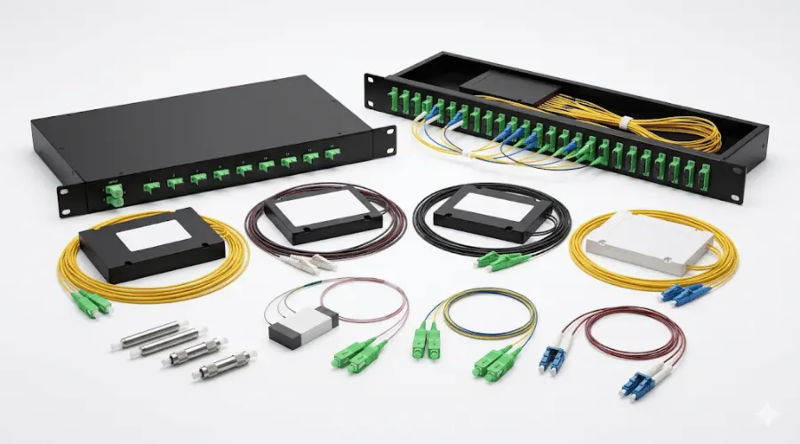
What Is a Fiber Optic Coupler?
A fiber optic coupler is an optical component with one or more input ports and one or more output ports. Its purpose is to manage optical signal distribution - not just physical continuity. The ITU-T Recommendation G.671, which defines transmission characteristics of passive optical components, classifies branching devices (including couplers) as core passive elements in both long-haul and access networks.
In practical terms, a coupler performs one or more of the following functions: splitting optical power from one input into two or more outputs, combining optical power from multiple inputs into one output, or doing both simultaneously in a bidirectional configuration. That is why the terms optical splitter, optical combiner, and 2×2 coupler are all closely related - they describe specific operating modes within the broader coupler family.
How a Coupler Differs from a Connector, Adapter, or Splice
A fiber optic adapter or a fusion splice creates a low-loss junction between two fibers. The goal is continuity: keep the signal moving with as little loss as possible. A coupler, by contrast, intentionally redistributes power. Once an input signal is split across multiple outputs, each output carries less power than the original. That power reduction is not a defect - it is the coupler's designed function.
This is why coupler specifications always include parameters such as splitting ratio, insertion loss, and excess loss. These numbers tell you how much power reaches each output port and how much is lost in the process.
How Does a Fiber Optic Coupler Work?
The working principle depends on the manufacturing technology, but the user-facing result is the same: light entering one or more input ports is distributed across one or more output ports according to a defined ratio.
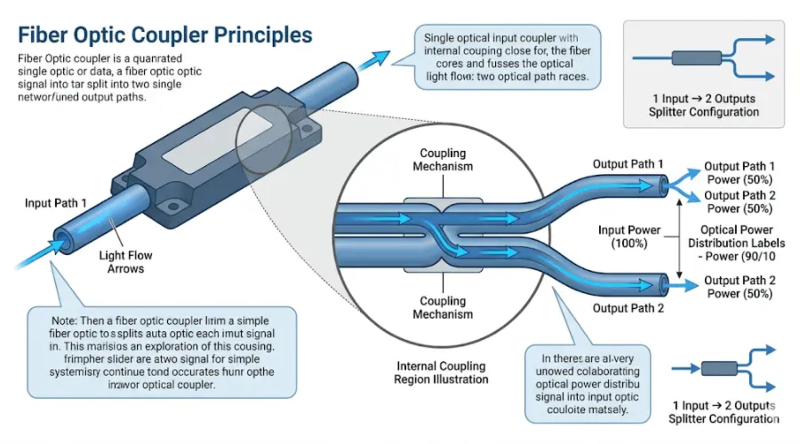
Evanescent Wave Coupling in Fused Couplers
The most common construction method is the fused biconical taper (FBT) technique. Two or more fibers are twisted together, heated, and stretched until their cores are close enough for the evanescent optical field from one core to "leak" into the adjacent core. According to Newport Corporation's technical note on fused couplers, the energy transfer between cores is periodic - it depends on the interaction length and the wavelength of light. By controlling the length of the fused region, manufacturers set the coupling ratio to a target value such as 50:50, 90:10, or 80:20.
Planar lightwave circuit (PLC) couplers use a different approach. Instead of fusing fibers, they route light through waveguides etched onto a silica chip using semiconductor fabrication techniques. This allows higher port counts (up to 1×64 or more) with uniform splitting across all outputs - something that becomes increasingly difficult with FBT construction above 1×4 configurations.
Key Performance Parameters
Every coupler specification includes a few critical numbers that directly affect network design:
- Splitting ratio (also called coupling ratio) defines how optical power is divided among outputs. A 50:50 ratio means each output gets half the input power. Unequal ratios such as 90:10 or 70:30 are used when one port needs most of the signal (the throughput port) while the other receives just enough for monitoring (the tap port).
- Insertion loss measures the total power reduction from one input to one output, expressed in dB. It includes both the intentional splitting loss and any excess loss from manufacturing imperfections. As defined in ITU-T G.671, insertion loss is the reduction in optical power between an input and output port of a passive component.
- Excess loss is the difference between the total input power and the sum of all output powers. It represents energy absorbed or scattered inside the coupler - power that reaches no output at all. Lower excess loss means a more efficient device.
- Directivity (also called optical return loss in some contexts) indicates how well the coupler isolates its input ports from backward-propagating light. High-quality fused couplers typically achieve directivity better than −55 dB.
What Is the Difference Between a Fiber Optic Coupler, a Splitter, and a Combiner?
This is the most common source of confusion in procurement and technical discussions. The short answer: a splitter and a combiner are both types of coupler. The term "fiber optic coupler" is the broad category; "splitter" and "combiner" describe specific functions within that category.
A splitter takes one input and distributes it to multiple outputs. A combiner does the reverse - multiple inputs into one output. A 2×2 coupler (sometimes called an X coupler) can function as either a splitter or a combiner depending on which ports are used, and in some configurations it does both simultaneously.
In FTTH and PON networks, you will more often hear the term "splitter" because the primary function is distributing a downstream signal from an OLT to multiple subscribers. In test and monitoring setups, "coupler" is used more frequently because the device may be tapping a signal rather than distributing it evenly. The underlying physics is the same - what changes is the application context and the split ratio.
For a deeper comparison of splitter technologies, see our guide to FBT and PLC type splitters.
Fiber Optic Coupler Types
Couplers are classified along several dimensions. Understanding these categories helps narrow the selection quickly.
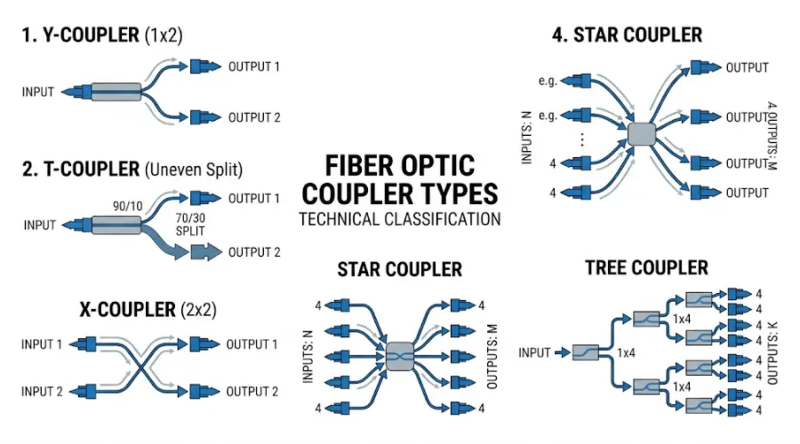
By Structure and Port Configuration
Y coupler (1×2): Splits one input equally into two outputs. This is the simplest configuration, often used in basic power distribution or optical tap functions. The Y designation comes from the geometry of the signal path.
T coupler: Also a 1×2 device, but with an uneven split ratio - typically 90:10, 80:20, or 70:30. The T coupler is common in monitoring setups where one output (the tap port) feeds a power meter or test instrument while the throughput port carries the main signal with minimal loss. In rural FTTx deployments, unbalanced splitting can also help compensate for varying trunk distances between subscribers.
X coupler (2×2): Has two inputs and two outputs. It can split, combine, or do both depending on the port assignment. This is the most versatile single-stage coupler and is widely used in fiber-optic interferometers, bidirectional links, and signal monitoring applications.
Star coupler: Distributes power from multiple inputs to multiple outputs (for example, 4×4, 8×8, or 8×16). Star couplers were historically important in legacy LAN architectures and remain relevant in certain test and broadcast scenarios.
Tree coupler: Takes one input and branches it into many outputs (for example, 1×4, 1×8, 1×16, or higher). In reverse, it combines many inputs into one. Tree couplers are the foundation of cascaded passive optical distribution in FTTx networks, where the first-stage splitter connects to the OLT and subsequent stages serve distribution points closer to subscribers.
By Manufacturing Technology: FBT vs. PLC
The choice between fused biconical taper (FBT) and planar lightwave circuit (PLC) technology is one of the most consequential decisions in coupler procurement. The differences are not just academic - they affect cost, reliability, port count, wavelength flexibility, and environmental tolerance.

| Parameter | FBT Coupler | PLC Splitter |
|---|---|---|
| Manufacturing method | Fusing and tapering optical fibers | Waveguides etched on silica chip |
| Typical port count | 1×2 to 1×4 native; higher via cascading | 1×2 up to 1×64 (or 2×64) on a single chip |
| Supported wavelengths | 850 nm, 1310 nm, 1550 nm (narrow windows) | 1260–1650 nm (full operating band) |
| Splitting uniformity | Good at low port count; degrades above 1×8 | High uniformity across all ports |
| Custom split ratios | Highly flexible (90:10, 80:20, 70:30, etc.) | Typically equal-ratio only (standard models) |
| Operating temperature | −5 °C to +75 °C | −40 °C to +85 °C |
| Failure rate at high splits | Increases above 1×8 (cascaded construction) | Low, even at high split ratios |
| Relative cost | Lower at 1×2 and 1×4 | Lower at 1×8 and above; higher at low splits |
In practice, FBT couplers are preferred for low-split-count applications, monitoring taps, and scenarios where custom unequal ratios are needed - such as directing 1–3% of power to a test port. PLC splitters dominate in high-split FTTH and PON deployments where uniform output, wide wavelength compatibility, and environmental stability matter most. For more detail on PLC configurations, see our guide to PLC splitter types.
By Bandwidth and Fiber Mode
Single-window couplers operate at one specific wavelength (for example, 1310 nm or 1550 nm). Dual-wavelength couplers support two wavelength bands and are common in PON networks that carry different services on 1310 nm and 1490/1550 nm simultaneously. Wideband couplers cover a broad wavelength range and provide the most flexibility for future wavelength upgrades.
On the fiber mode side, single mode and multimode fiber require different coupler designs. A single mode coupler is built for 9/125 μm fiber used in long-distance and high-bandwidth links. A multimode coupler matches 50/125 μm or 62.5/125 μm fiber common in shorter campus and data center connections. Mismatching the fiber mode between the network and the coupler is a frequent procurement error that causes excessive loss and unreliable performance. For a closer look at multimode classifications, see our multimode fiber types guide.
Passive vs. Active Couplers
Passive couplers require no electrical power - they redistribute light entirely through optical physics. This is the dominant type in deployed networks. Active couplers, by contrast, convert optical signals to electrical, process them, and convert back. They can amplify or regenerate signals, but they are more complex, more expensive, and introduce different failure modes. Unless you specifically need signal regeneration or electronic-level control, passive couplers are the standard choice.
When Should You Use a 1×2 vs. 2×2 Fiber Optic Coupler?
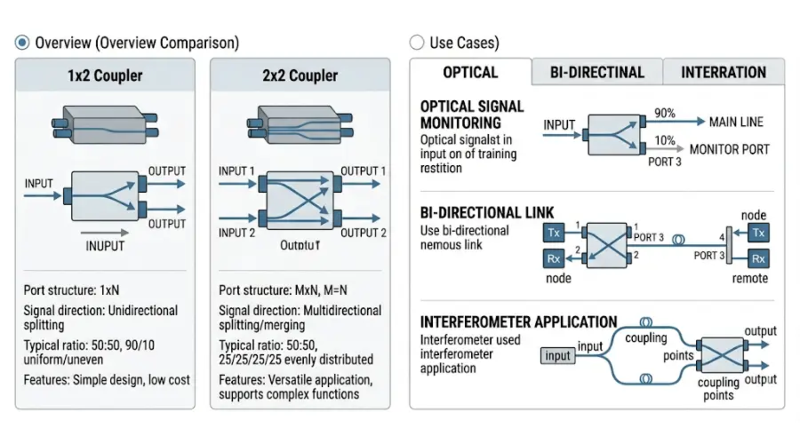
A 1×2 coupler has one input and two outputs. It is the right choice when you simply need to split a single signal into two paths - for instance, feeding two downstream distribution points from one trunk fiber, or tapping a percentage of signal power for monitoring while the main path continues uninterrupted.
A 2×2 coupler has two inputs and two outputs. Its advantage is bidirectional flexibility. In a Michelson or Mach-Zehnder interferometer, both input ports are active. In network monitoring, a 2×2 coupler allows you to insert a tap in both directions of a duplex link simultaneously. It is also the standard building block for constructing higher-order FBT splitters by cascading - for example, three 2×2 couplers combined internally to produce a 1×4 output.
If your application only requires one-directional splitting, a 1×2 is simpler and typically has slightly lower excess loss. If you need bidirectional capability or plan to use both input ports, choose a 2×2.
Common Applications of Fiber Optic Couplers

PON and FTTx Networks
In passive optical network architectures (GPON, XGS-PON, and their variants), couplers - specifically tree-type PLC splitters - are the primary means of distributing the OLT's downstream signal to multiple ONTs. A typical two-stage cascaded deployment might use a 1×4 splitter at the central office and 1×8 splitters at distribution points, achieving an effective 1×32 split across the access network. The optical power budget defined in standards like ITU-T G.984.2 (for GPON) directly constrains how many split stages and what total split ratio the network can support.
Signal Monitoring and Testing
One of the most practical coupler applications is non-intrusive signal tapping. A 90:10 or 95:5 FBT coupler inserted in a live fiber link diverts a small percentage of power to a monitoring port - enough for an optical power meter or protocol analyzer to read, without meaningfully affecting the main signal path. This technique is standard practice in central offices, data centers, and field testing. It avoids the need to break or disconnect the link for measurement.
LAN and Campus Networks
In campus fiber backbones and building distribution networks, couplers support signal distribution in star or bus topologies. Star couplers serve broadcast-style architectures where every node needs to receive the same signal. T couplers with unequal splits serve bus topologies where each node taps off a fraction of the backbone signal. For practical guidance on campus fiber component selection, see our campus connector selection guide.
WDM and Passive Optical Subsystems
Couplers also appear in wavelength-division multiplexing systems, where wavelength-selective fused couplers can function as basic mux/demux devices for separating or combining signals at different wavelengths (for example, 1310 nm and 1550 nm on the same fiber). In more complex WDM architectures, dedicated arrayed waveguide gratings or thin-film filters replace simple couplers, but for low-channel-count applications, a wavelength-dependent fused coupler remains a cost-effective option.
How to Choose the Right Fiber Optic Coupler: A Step-by-Step Approach
Selecting a coupler is not complicated if you work through the requirements systematically. Here is a practical sequence that covers the decisions in the order they matter most.

Step 1: Define the Function
Are you splitting one signal into many? Combining multiple signals into one? Tapping a small percentage for monitoring? Or do you need bidirectional split-and-combine capability? The answer determines whether you need a 1×N splitter, an N×1 combiner, a 2×2 coupler, or a tap coupler with unequal ratio.
Step 2: Confirm the Fiber Mode
Check what fiber is already installed. If the network uses single mode fiber, the coupler must be single mode. If it uses multimode (OM1 through OM5), match accordingly. This is non-negotiable. A single mode coupler on a multimode link - or vice versa - will cause excessive loss and unpredictable performance. In field deployments, this mismatch is one of the top causes of "mysterious" link degradation that is difficult to diagnose without physical inspection.
Step 3: Set the Port Count and Split Ratio
Determine how many output ports you need: 1×2, 1×4, 1×8, 1×16, 1×32, or higher. Then decide whether the power split should be equal or unequal. For subscriber distribution in FTTx, equal splitting is standard. For monitoring taps, you typically want a heavily unequal ratio (90:10 or higher) to minimize impact on the main signal. For specific 1×2, 1×8, or 1×32 configurations, standard PLC splitter products are widely available.
Step 4: Confirm the Wavelength Window
If your network uses only 1310 nm, a single-window coupler is sufficient. If it carries both 1310 nm and 1550 nm (as most PON systems do for voice/data and video), you need at least a dual-wavelength device. If future wavelength additions are likely, choose a wideband coupler or PLC splitter that covers the full 1260–1650 nm range.
Step 5: Check the Optical Power Budget
Every coupler adds insertion loss to the link. Before ordering, calculate whether your optical budget can absorb it. Add the coupler's insertion loss to all other losses in the path - patch cord loss, connector loss, splice loss, and fiber attenuation - and compare the total against the transmitter-to-receiver power margin. If the margin is tight, consider a lower-split-ratio coupler or fewer cascaded stages.
Step 6: Choose the Package and Connector Type
Couplers come in bare fiber, mini-tube, ABS box, LGX cassette, and rack-mounted packages. The right choice depends on the installation environment: indoor rack, outdoor enclosure, splice tray, or terminal box. Connector type (SC/APC, SC/UPC, LC/UPC, or bare fiber for fusion splicing) should match the existing infrastructure to avoid unnecessary adapters or hybrid patch cords.
Common Selection Mistakes and How to Avoid Them
In field procurement and network design, a few errors come up repeatedly:
Choosing by product name instead of function.
A product labeled "coupler" and one labeled "splitter" may be physically identical devices with different packaging or marketing labels. Always specify by function (split ratio, port count, fiber mode) rather than by trade name.
Ignoring insertion loss in budget calculations.
A 1×32 PLC splitter adds roughly 17–18 dB of insertion loss to the link. If the optical budget is only 28 dB (as in Class B+ GPON), there is very little margin left for fiber, connectors, and splices. Failing to account for coupler loss is a common cause of marginal links that work during installation but fail after environmental changes or component aging.
Mixing single mode and multimode components.
This happens more often than expected, especially in campus networks where both fiber types may coexist in the same building. The coupler must match the fiber type end-to-end.
Assuming all high-port-count splitters are equivalent.
An FBT-based 1×16 (built by cascading seven 1×2 stages) has different uniformity, temperature stability, and failure characteristics than a PLC-based 1×16 on a single chip. For high-split applications, PLC is generally more reliable and more compact.
Overlooking wavelength requirements.
An FBT coupler optimized for 1310 nm may have significantly higher loss at 1550 nm. If the network carries multiple wavelengths, verify that the coupler performs within spec across all of them.
Frequently Asked Questions About Fiber Optic Couplers
Is a fiber optic coupler passive or active?
The vast majority of deployed couplers are passive - they split or combine light without requiring electrical power. Active couplers exist but are used in specialized applications where optical-to-electrical-to-optical conversion or signal amplification is needed.
What is the difference between a coupler and a PLC splitter?
A PLC splitter is a specific type of coupler built using planar lightwave circuit technology. The term "coupler" is the broader category. In everyday usage, "splitter" usually refers to a device whose primary function is dividing one input among many outputs, while "coupler" may also cover combining and bidirectional functions. For a detailed comparison, see our couplers and splitters overview.
Can one coupler both split and combine signals?
Yes. A 2×2 (X) coupler can function as a splitter when one input port is used and both output ports receive signal, or as a combiner when both input ports carry signals that are merged at one output. This bidirectional capability makes 2×2 couplers popular in interferometric sensing and duplex monitoring applications.
How do I choose between single mode and multimode couplers?
Match the coupler to the fiber already installed in your network. Single mode couplers are designed for 9/125 μm fiber used in long-reach and high-bandwidth systems. Multimode couplers are designed for 50/125 μm or 62.5/125 μm fiber used in shorter-distance campus, building, and data center links. Using the wrong mode type will cause unacceptable loss and signal degradation.
What split ratios are available for FBT couplers?
FBT technology offers high flexibility in split ratio customization. Common ratios include 50:50, 90:10, 80:20, 70:30, and 60:40, but manufacturers can produce other ratios on request. This makes FBT couplers particularly useful for monitoring taps where you need to divert only 1–10% of signal power while preserving the rest for the main link.
Why does my coupler's insertion loss not match the theoretical splitting loss?
Theoretical splitting loss for a 1×2 equal split is 3.0 dB (half the power to each output). In practice, every coupler also introduces excess loss - additional attenuation caused by manufacturing imperfections, scattering, and absorption in the coupling region. Total insertion loss is always higher than the theoretical minimum. A well-made FBT 1×2 coupler typically has 3.2–3.5 dB insertion loss per output; a PLC 1×2 is usually around 3.5–3.8 dB.
How many split stages can I cascade before the signal is too weak?
This depends entirely on the optical power budget of the system. Each stage adds its own insertion loss. For GPON (Class B+, 28 dB budget), a typical maximum is 1×32 total split across one or two stages, leaving enough margin for fiber attenuation and connector losses. For XGS-PON or higher-budget systems, larger cascaded configurations may be possible. Always calculate the full link budget before committing to a split architecture.
Conclusion
A fiber optic coupler is the component that controls how optical power is shared across a network's fiber paths. Whether you are distributing a PON signal to 32 subscribers, tapping 5% of a backbone link for monitoring, or combining signals from two sources into a single output, the right coupler makes the link work within its optical budget.
The selection process is straightforward when approached systematically: start with the function, confirm the fiber mode, set the port count and split ratio, verify the wavelength window, check the power budget, and choose the physical package. Most procurement errors - mismatched fiber modes, overlooked insertion loss, or selecting by product label instead of specification - are avoidable with this basic checklist.
For specific product options, explore our PLC splitter product line or FBT coupler options, or contact our engineering team for guidance on custom split ratios and packaging configurations.