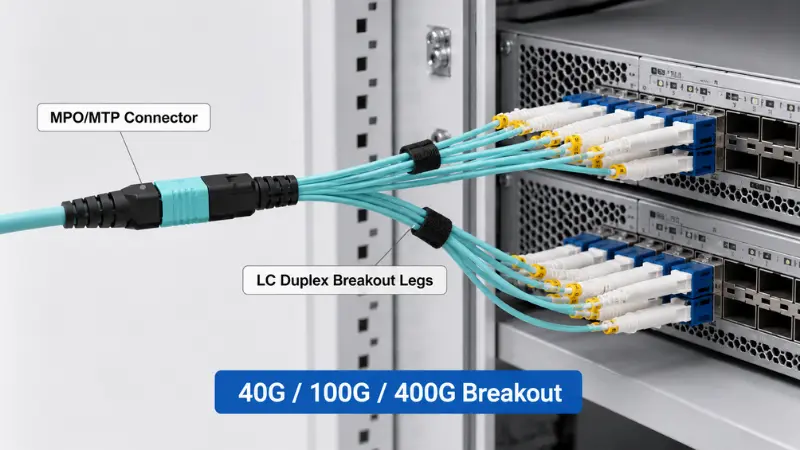
An MPO breakout cable lets a single high-density multi-fiber connector fan out into several individual connectors, most often LC duplex, so a parallel backbone link can feed individual transceivers, panel ports, or duplex equipment. It is one of the most common ways to connect a 40G, 100G, or 400G parallel port to lower-speed devices, or to land an MPO trunk on duplex hardware in the same rack.
The hard part is not the definition. It is matching the fiber count, polarity, gender, fiber mode, and breakout mapping to the rest of the channel. A cable can mate perfectly and still pass no light if the polarity or pinning is wrong. This guide is written as a selection and ordering reference: what the types are, how to read polarity and gender, which configurations map to which transceivers, and exactly what to confirm before you place an order.
What Is an MPO Breakout Cable?
An MPO breakout cable, also called an MPO fanout or MTP/MPO harness, is a factory-terminated assembly with one MPO connector on the trunk end and multiple individual connectors on the fanned-out end. The MPO end carries 8, 12, 16, or 24 fibers in a single ferrule. The breakout end splits those fibers into separate legs, usually LC duplex pairs, though SC, FC, MU and ruggedized versions exist for legacy, industrial or outdoor equipment.

The classic example is an MPO to LC breakout cable: one MPO connector terminating into four, six, or twelve LC duplex pairs depending on the fiber count. This is what physically turns a parallel port into individual duplex links.
How an MPO Breakout Cable Works?
The assembly maps each fiber position inside the multi-fiber ferrule to a specific leg on the breakout side. The mapping is governed by fiber count and polarity, and it has to agree with the optics at both ends of the channel.

The MPO/MTP Trunk Side
This is the high-density end. In data center breakout, 8-fiber and 12-fiber connectors are the most common, with 16-fiber and 24-fiber used for higher-lane optics and very dense patching. You will see both "MPO" and "MTP" on datasheets. MPO is the generic interface defined in IEC 61754-7 and TIA-604-5 (FOCIS 5), and produced by US Conec and other manufacturers, while MTP is US Conec's registered-trademark, high-performance version of the same connector, built with floating ferrules and tighter guide-pin tolerances for lower loss. They are fully intermateable, so the practical question is not the badge but the gender, polarity, and grade you specify. If the terminology still trips you up, our breakdown of the real differences between MPO and MTP covers it in plain language.
The Breakout (Fanout) Side
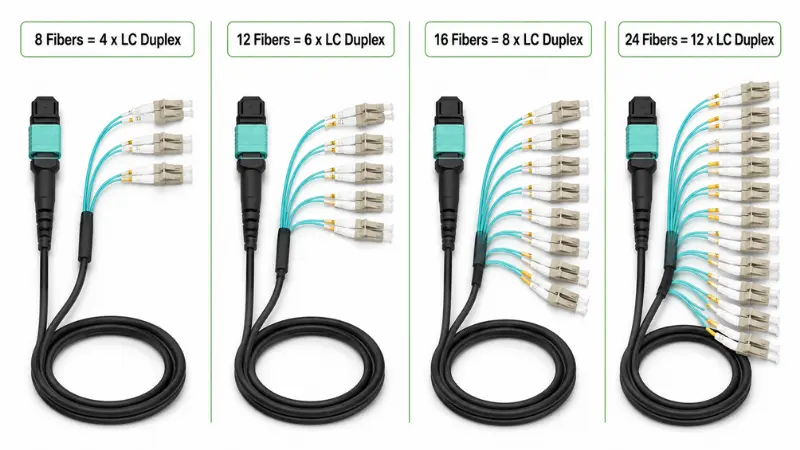
LC duplex dominates the breakout end because LC is the standard duplex interface on most switches, servers, and transceivers. The fiber count determines how many duplex legs you get:
| MPO fiber count | Typical breakout | Where it fits |
|---|---|---|
| 8 fibers | 4 x LC duplex | 4 duplex links, full fiber use (no idle fibers) |
| 12 fibers | 6 x LC duplex, or 4 active pairs with 4 idle fibers in some SR4 links | Structured cabling and 40G/100G SR4 breakout |
| 16 fibers | 8 x LC duplex | 8-lane optics such as 400G-SR8 and 800G-SR8 |
| 24 fibers | 12 x LC duplex | High-density patch fields (needs clear labeling) |
The Tx/Rx Polarity Path
Every duplex link has to land transmit on one side and receive on the other. In a parallel system the breakout cable, the trunk, the adapters, and the patch cords each contribute to that path. Get one element backwards and the connectors will still seat, but the optical path breaks. That is why Type A, Type B, and Type C are never interchangeable, and why polarity is a channel-level decision rather than a per-cable choice. We expand on this below.
Types of MPO Breakout Cables
"MPO breakout cable" is a family, not a single part. Two cables that look identical can behave completely differently. The practical way to specify one is to walk through these axes:
- By fiber count: 8, 12, 16, or 24 fibers. This is the first decision and it follows directly from how many duplex links you need.
- By breakout connector: LC duplex is standard; SC, ST, FC, MU, VSFF and ruggedized terminations all exist. The full option matrix is further down this page.
- By leg grouping: simplex, duplex, or quad-fiber legs, and equal or staggered leg lengths.
- By fiber mode: multimode (OM3, OM4, OM5) for short reach, or single-mode (OS2) for longer distances. See single-mode versus multimode fiber if you are unsure which the link calls for.
- By polarity: Type A, Type B, or Type C, matched to the channel.
- By MPO gender: pinned (male) or unpinned (female).
- By connector polish: UPC or APC. Single-mode MPO is almost always APC; multimode is typically flat PC.
- By jacket and construction: PVC, LSZH, riser, or plenum; round single-jacket fanout versus individually jacketed legs; standard or armored.
- By loss grade: standard-loss or low-loss connectors, which matters when the power budget is tight.
From a supplier's perspective: start the spec from the transceiver datasheet and the panel it lands in, not from the cable catalog. Almost every wrong order we see comes from picking a part number first and reverse-fitting the channel to it.
Base-8 vs Base-12 vs Base-16
This is the second-level question that the fiber count alone does not answer, and it is where a lot of "future-proofing" goes wrong. The "Base" number is the fiber increment the cabling is built around.

| System | Fiber use for parallel optics | Best matched to |
|---|---|---|
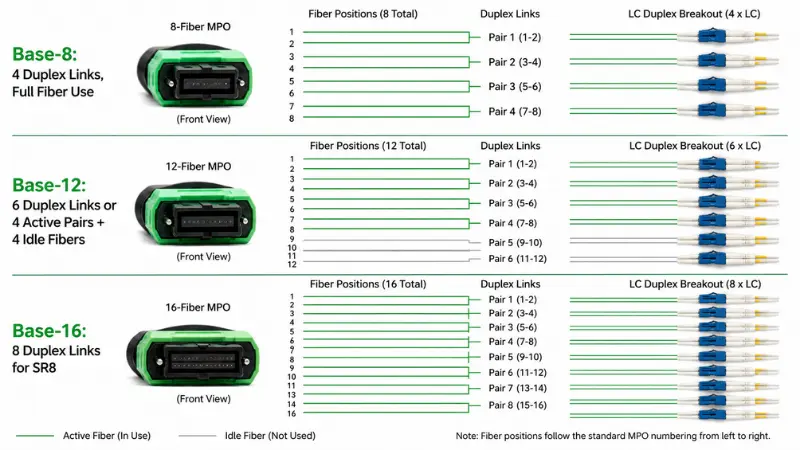
| Base-8 | 100% utilization for 4-lane optics (8 fibers = 4 duplex) | 40G-SR4, 100G-SR4, 400G-DR4 breakout with no idle fibers |
| Base-12 | For SR4 over a 12-fiber MPO, only 8 of 12 fibers carry traffic | Legacy installs and native 12-fiber duplex trunks (6 x LC) |
| Base-16 | 100% utilization for 8-lane optics (16 fibers = 8 duplex) | 400G-SR8, 800G-SR8 and DR8 breakout, and the 1.6T path under IEEE 802.3dj |
The point that often gets missed: a 12-fiber MPO used for a 40G or 100G SR4 channel leaves four fibers dark. That is not a defect, but it means a Base-8 breakout is usually the cleaner, more economical choice for four-lane breakout, while Base-12 makes sense when the trunk genuinely carries six duplex links. The Ethernet rates and lane counts behind all of this are defined by the IEEE 802.3 working group (40G/100G parallel optics in 802.3ba, 200G/400G in 802.3bs).
Type A vs Type B vs Type C Polarity
Polarity is the single most common reason a freshly installed MPO link does not work. The three classic methods differ in how the trunk is wired and which patch cords complete the path.
| Method | Trunk type | Array adapter | Duplex patch cords | Notes |
|---|---|---|---|---|
| Method A | Type A, straight-through | Key-up to key-down | A-to-B on one end, A-to-A on the other | Flexible, but needs two patch-cord types |
| Method B | Type B, reversed | Key-up to key-up | A-to-B on both ends | Single patch-cord type; widely used for parallel optics |
| Method C | Type C, pair-flipped trunk | Key-up to key-down | A-to-B on both ends | Flips handled inside the trunk; common for legacy duplex |
How to choose, in practice: pick one method for the whole installation and keep it consistent end to end. For parallel-optics breakout, Method B is the most common because it uses one patch-cord type and avoids accidental transmit-to-transmit pairing. The ANSI/TIA-568.3-E standard formalizes Methods A, B, and C and, since its 2022 revision, adds two "universal" methods (U1 and U2) that let you use the same modules and cords on both ends of a Type-B trunk. If your design is built around cassettes, follow the polarity scheme the cassette system specifies rather than mixing schemes. For background on where array connectivity sits against duplex, see our guide to LC versus MTP/MPO in high-density cabling.
Single-mode changes the arithmetic. Single-mode MPO is APC, and two 8-degree angled faces can only meet if one key is up and the other is down. A Type-B array adapter mates key-up to key-up, so it is physically incapable of closing an APC pair without leaving an air gap. Method B on a single-mode channel is therefore built with Type-A adapters and Type-B cable, a configuration the test community calls Modified Method B. If a quotation for APC MPO breakout assemblies comes back listing "Type B adapters," the supplier has read the letter and not the end face.
The same angle removes your recovery option. Field-reconfigurable connectors let an installer flip polarity or swap pins on multimode UPC assemblies; on APC the ferrule angle makes rotation destructive, so single-mode polarity is fixed at the factory and a mis-specified reel becomes a reorder. This also explains the split in the two universal methods: U1 uses Type-A array adapters and covers both fiber modes, U2 uses Type-B adapters and suits multimode only. Both support duplex signal polarity alone, so array-to-array polarity remains an A, B, or C question. Our note on PC, UPC, and APC end-faces covers the geometry behind this.
MPO Male vs Female: How to Choose?
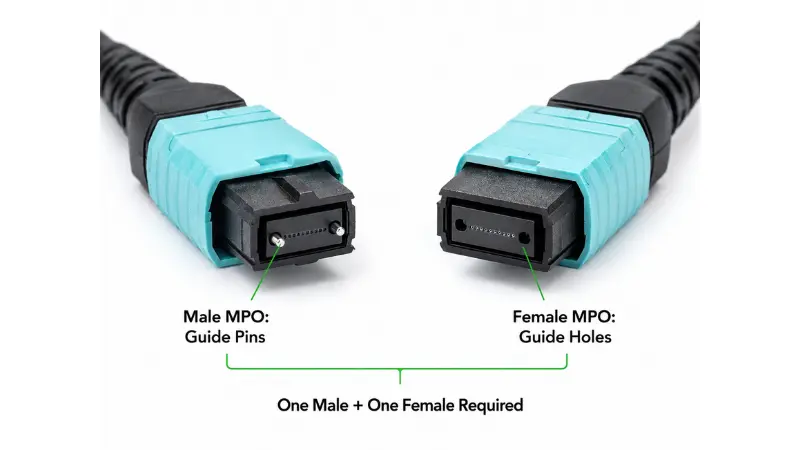
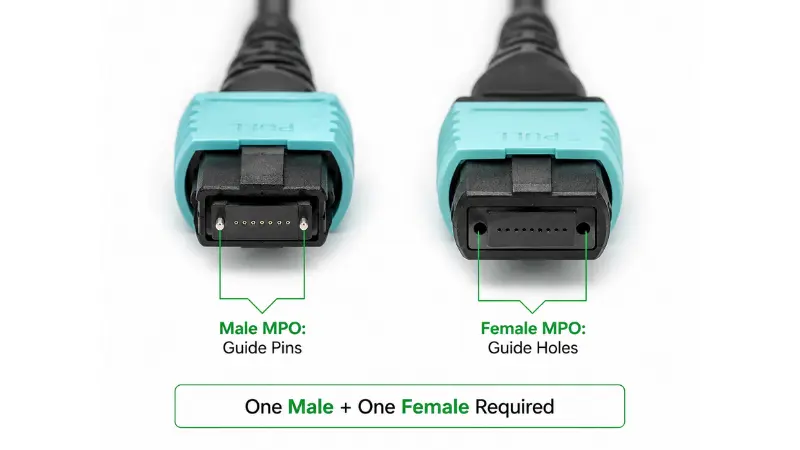
MPO gender is about the guide pins in the ferrule. A pinned (male) connector has two metal pins; an unpinned (female) connector has the matching holes. The rule is absolute: every mated pair must be one pinned and one unpinned. Two pinned connectors physically conflict and can crush the pins or chip the ferrule; two unpinned connectors have nothing to align them and will not seat correctly.
In a typical breakout deployment the direction runs opposite to what most people assume. QSFP+, QSFP28, QSFP-DD and OSFP parallel-optic receptacles carry the guide pins inside the module, so the leg that plugs into a transceiver must be unpinned. NVIDIA, Cisco and Extreme all specify female cable connectors against their SR4, DR4 and SR8 modules. Mating a pinned assembly into a pinned receptacle drives two sets of steel pins straight into the MT ferrule face, and the outcome is a replaced module rather than a failed test.
ANSI/TIA-568.3-E applies the same logic to structured cabling: trunks are pinned, while MPO-to-LC transitions, cassettes and fanout assemblies are unpinned. That convention leaves exactly one pinned face at every mating point from the module back to the backbone. Where a leg lands on a panel instead of a module the gender inverts again, because rear-side array adapters often present pins of their own. Read the receptacle gender from the transceiver datasheet, read the rear-side pinning of your MPO/MTP adapters, and only then lock the unpinned MPO-F breakout configuration onto the purchase order.
MPO Breakout Cable vs Module vs Cassette
These three are related but solve different problems. The choice comes down to how structured and maintainable the link needs to be.
| Option | What it is | Best for | Main advantage |
|---|---|---|---|
| Breakout cable | One MPO/MTP fanning directly to LC, SC, or FC legs | Same-rack equipment links, quick deployment | Simple, space-saving, fewest connection points |
| Breakout module / panel | A module taking MPO input and presenting LC/SC ports on the front | Inter-rack links and organized patch fields | Front-panel patching, labeling, easier maintenance |
| MPO cassette | A modular cassette inside a patch panel converting MPO trunks to duplex | Structured, scalable cabling | Clean moves, adds, and changes |
Use a loose fanout when the route is short and the connection is direct. Once a link crosses racks or will see frequent changes, an MPO cassette or panel usually pays for itself in easier troubleshooting and labeling.
Fanout Leg Options: Connectors, Leg Counts and Boot Styles
LC duplex covers most data center work, but vendor cable builders expose a much wider option list, and the wrong choice there produces an assembly that mates fine and still fails your rack. Two axes drive it: what terminates each leg, and how the fibers are grouped into legs.
Leg Termination
Every option below is buildable. The question is whether your installed equipment justifies it.
| Leg termination | Where it earns its place | What to watch |
|---|---|---|
| LC duplex, standard boot | Switch, server, and transceiver ports | Default choice; nothing to flag |
| LC uni-boot duplex | Dense patch fields; the 2-lane uni-boot build | Halves leg bulk, but polarity is fixed at the boot and is not field-swappable |
| LC short boot (LC-SB) and LC 90-degree (LC90) | Shallow racks and cabinets where the door closes on the bend | Angled boots have a fixed exit direction; specify left or right |
| SC | Telecom rooms, ODF frames, older campus plant | Footprint is roughly twice LC per port |
| ST and FC | Test benches, instrumentation, high-vibration industrial plant | The FC threaded coupling resists vibration; both are legacy on new builds |
| MU and D4 | Japanese transport gear (MU); pre-SC legacy spares (D4) | Order only against an installed base, and expect longer lead time |
| MPO legs (MPO-M / MPO-F) | Array-to-array conversion rather than duplex breakout | See the conversion harness section below |
| CS, SN, MDC very small form factor | 400G and 800G duplex breakout at extreme port density | Confirm the panel accepts the VSFF footprint before ordering |
| IP67 / IP68 ruggedized | Outdoor cabinets, 5G remote radio sites, factory floor | Sealed housings need matched bulkheads at both ends |
| Blunt (unterminated) | Splice-on into a closure or a field-terminated panel | Specify furcation tube length and fiber slack for the splice tray |
Legacy and instrumentation legs are routine work rather than exotica. Our 24-fiber MTP to FC/APC harness is a standing example of a non-LC fanout built to a rack map, and the full fiber optic patch cord range lists the LC, SC and FC terminations we hold tooling for.
Leg Grouping and the Word "Lane"
Cable builders use "lane" loosely. On most configurators an 8-lane MPO breakout means eight physical legs, not the eight electrical lanes of an SR8 module. Confirm which meaning your supplier uses before signing off a drawing. A 16-fiber MPO can be built as eight duplex legs, sixteen simplex legs, or four quad-fiber legs, and each produces a different label scheme and a different bundle diameter:
- Duplex legs. Two fibers per leg, one connector pair per link. The default for switch and server ports.
- Simplex legs. One fiber per leg. Finest patching granularity and the worst cable management; a 24-fiber simplex fanout puts 24 loose legs into one rack unit.
- Quad-fiber legs. Four fibers per leg, used for sub-unit routing into a splice tray or a four-lane sub-assembly rather than into a transceiver.
Leg Length
Equal-length legs fit flat adapter panels. High-density fixed switches with stacked port rows need staggered leg lengths, otherwise the far-row legs sit under tension while the near-row legs violate bend radius. Send the switch model number with the RFQ. A custom MPO fanout cable with staggered legs costs the same to build as one with equal legs when it is specified before production rather than discovered after installation.
Conversion Harnesses: When Both Ends Stay MPO
A breakout cable ends in discrete connectors. A conversion harness keeps MPO on both ends but changes the fiber count per connector: one 24-fiber MPO into two 12-fiber MPOs, one 24-fiber into three 8-fiber, three 8-fiber into two 12-fiber. Configurator notation writes these as 24x1 to 12x2, 24x1 to 8x3, and 8x3 to 12x2. The unit being counted is the connector, not the fiber.
The reason this product exists is stranded fiber. A site pre-wired with Base-12 trunks that now needs Base-8 parallel optics has four dark fibers on every SR4 or DR4 channel. Three 8-fiber channels drawn out of a 24-fiber trunk reach full utilization without pulling new backbone. On a run where the conduit is full or the pathway is finished, that is the difference between a patching change and a construction project. Our data center fiber cabling solution page covers where these sit in a zoned layout.
Two constraints get skipped at quotation time. First, a conversion harness inserts an additional connector pair into the channel, and IEEE 802.3 allows roughly 1.9 dB of total channel insertion loss for 100GBASE-SR4 on OM4. A standard-grade MPO pair can consume 0.5 dB or more of that on its own, so on a channel that already carries a trunk pair and a patch pair, the harness is what pushes it over. Specify low-loss grade on conversion builds even where standard grade was acceptable on the trunk. Second, polarity has to be resolved as a fiber-position map rather than as a letter. Method A describes a straight-through 1:1 trunk; it does not tell a factory which of 24 input positions land on which of three output connectors. Send a position table or an approved drawing with the RFQ and ask for the wire map back before production, particularly on 16-lane conversion harness builds where Base-16 keying differs from Base-12 and no mechanical interlock will catch a mapping error.
Conversion Harness or New Trunk: A Procurement Comparison
| Decision dimension | Conversion harness | Pulling new Base-8 trunk |
|---|---|---|
| Existing backbone | Retained; the 12- or 24-fiber trunk reaches full utilization | Abandoned, or left as spare capacity |
| Optical budget | Adds one connector pair. A standard-grade MPO pair can take 0.5 dB out of the 1.9 dB a 100GBASE-SR4 channel on OM4 is allowed, so low-loss grade is not optional here | No added pair; the full budget is preserved |
| Physical work | Patch-field change only; no pathway access needed | Requires conduit capacity and pathway access, usually the real blocker |
| Lead time | Built to order against your fiber position map. Schedule it; do not treat it as a stock item | Trunk lengths are stocked, but installation labour dominates the schedule |
| Documentation risk | High. A polarity letter does not define which of 24 input positions land on which output connector, so a position table is mandatory | Low. Standard trunk polarity is a single letter |
| Best fit | Finished sites, filled pathways, phased migration off Base-12 | Greenfield, or channels already at the edge of their loss budget |
The row most quotations omit is the optical budget. A conversion harness is cheaper as a line item and more expensive as a channel: on a link that already carries a trunk pair, a harness pair and a patch pair, standard-grade connectors will not survive a 400G or 800G PAM4 budget. If you want a configuration checked against your existing trunk map before you commit, send us the fiber position map and we will return the build sheet.
Common Applications

40G to 4x10G Breakout
A 40G QSFP+ SR4 port carries four 10G lanes over eight fibers. When the switch and optics support breakout mode, an MPO-to-LC assembly splits it into four independent 10G-SR duplex links. This is one of the most common reasons people buy breakout cables.
100G to 4x25G Breakout
A 100G QSFP28 SR4 port works the same way, splitting into four 25G links over eight fibers. Choosing the right mode and grade here matters because the per-lane budget is tighter; our walkthrough on how to choose 100G cabling goes into the trade-offs.
400G: Where Breakout Does and Doesn't Apply
400G is where the "MPO breakout for everything" assumption fails. It depends entirely on the transceiver interface:
- 400G-DR4 uses 8 single-mode fibers (four 100G lanes) and breaks out cleanly to 4 x 100G over a Base-8 MPO.
- 400G-SR8 uses 16 multimode fibers (eight 50G lanes) on a Base-16 MPO and can break out to 8 x 50G or 2 x 200G.
- 400G-FR4 and LR4 are duplex single-mode interfaces using wavelength multiplexing over a single LC pair. They do not use parallel fibers, so an MPO breakout cable does not apply at all.
So before selecting any 400G breakout, read the optical module specification first. The form factor (QSFP-DD, OSFP) does not tell you the fiber map; the interface type does.
800G and 1.6T: The Fiber Map Splits from the Speed
800G is where reading the module specification stops being good practice and becomes mandatory. 800GBASE-DR8 supports 8 x 100G and 2 x 400G breakout, and vendors ship it two ways: one variant presents a single MPO-16 APC, another presents dual MPO-12 APC. Same speed, same breakout result, incompatible assemblies. MPO-16 also uses a shifted key with pin positions closer to the ferrule edge, so it will not mate with an MPO-12 or MPO-24 at all. That is a useful mechanical safeguard, but it does not help once the wrong part is already on site.
IEEE 802.3dj, targeted for completion in 2026, moves signalling to 200G per lane. Under that regime 800GBASE-DR4 carries four 200G lanes over 8 fibers and 1.6T carries eight lanes over 16, which retires the shortcut of inferring fiber count from port speed. For a build that will still be in service in 2029, the practical hedge is to standardize the panel-side interface and let the module-side assembly be the replaceable element. Our notes on custom patch cord solutions for 400G and 800G networks go into the build options.
Where These Cables Show Up?
Typical homes for MPO breakout assemblies include spine-leaf fabric, switch-to-server links, storage networks, cross-connect fields, telecom rooms, campus backbones, and dense patch panels.
Common Configuration Examples
These are the configurations most projects actually order, with the products that match each one:
| Configuration | Common use | Notes |
|---|---|---|
| 8-fiber MTP to 4x LC duplex | 40G / 100G SR4 breakout | Base-8, full fiber use, no idle strands |
| 12-fiber MPO to 6x LC duplex | Structured cabling and duplex trunks | For SR4 links, 4 of 12 fibers may stay dark |
| 24-fiber MTP to FC/APC harness | High-density single-mode patching | Confirm APC polish and a clear leg label scheme |
When Not to Use an MPO Breakout Cable?
A loose fanout is the wrong tool when:
- The link runs between racks or rooms and will see regular moves, adds, and changes. A trunk plus cassette or panel is cleaner and easier to maintain.
- You need front-panel patching and durable labeling for operations staff.
- The port does not support breakout mode, or the interface is a duplex type such as 400G-FR4 that has no parallel fibers to break out.
- The design would mix single-mode and multimode in one channel, which is not allowed.
- The power budget is already tight and an extra set of connector pairs would eat into the margin.
Key Specifications to Confirm Before Ordering
Most field failures trace back to one of these being wrong. Confirm each against the channel, not the cable alone.
- Fiber count. Derive it from the number of duplex links you need: four links to an 8-fiber, six to a 12-fiber, twelve to a 24-fiber. Resist over-buying density "just in case."
- Polarity. Lock Type A, B, or C across the whole path: transceivers, trunks, cassettes, and patch cords.
- Connector type and gender. MPO or MTP; pinned or unpinned each end; key orientation; LC/SC/FC on the breakout side; UPC or APC.
- Fiber mode. Match the optics. OM3/OM4 for short multimode reach, OS2 single-mode for distance. If you are weighing grades, our notes on OM1 through OM5 multimode lay out the reach limits.
- Jacket and construction. PVC, LSZH, riser, or plenum to suit the environment, plus diameter, bend radius, and whether legs need individual jacketing or armor.
- Breakout length and labeling. The fanout-to-connector length must suit the rack; too short pinches the route, too long clutters it. Each leg should be labeled to your port map.
- Insertion loss and test report. For high-speed links, low-loss connectors protect the budget. Our explainer on insertion loss in fiber patch cords shows why a few tenths of a dB matter when several connector pairs stack up.
Jacket Ratings Are a Code Question, Not a Preference
Three ratings cover almost every order, and each is decided by where the cable runs rather than by what the buyer prefers. OFNR riser-rated PVC passes UL 1666 and is approved for vertical shafts between floors. OFNP plenum passes NFPA 262 and is what the NEC requires in air-handling spaces above ceilings and under raised floors. LSZH is qualified against IEC 60332 for flame spread, IEC 61034 for smoke density and IEC 60754 for halogen content, and in the EU it also carries a CPR Euroclass rating under EN 50575 and EN 50399.
The costly error runs in one direction only: LSZH is not a substitute for plenum. It limits toxic smoke, which is why European and Asian data centers standardize on it, but it does not satisfy NFPA 262, so an LSZH breakout assembly installed in a North American plenum space is a code violation an inspector will find. The reverse substitution is legal but wasteful, since OFNP jacketing costs more and is stiffer, which matters on a fanout leg that has to bend inside a 1U cable manager. For a bulk order spanning several sites, state the jacket rating per destination rather than picking one rating for the whole quantity, and ask for the certificate of compliance to reference the specific test standard instead of a marketing label.
RFQ Checklist for Custom MPO Breakout Cables
When you send a request for quote, including this list up front removes most back-and-forth and prevents rework:
- Data rate and transceiver model (for example 40G-SR4, 100G-SR4, 400G-DR4, 800G-DR8)
- Fiber mode and grade (OM3, OM4, OM5, OS2)
- MPO fiber count and Base type (8/12/16/24; Base-8/12/16)
- Breakout connector and polish (LC, SC, ST, FC, MU, VSFF, blunt; UPC or APC)
- Leg grouping and count (simplex, duplex, or quad-fiber legs; how many legs)
- Polarity method (A, B, C, or U1/U2), or a fiber position map for conversion builds
- MPO gender on each end (pinned or unpinned)
- Total length plus the breakout leg length, equal or staggered
- Jacket rating per destination site (OFNR riser, OFNP plenum, or LSZH) and the certificate of compliance you require
- Labeling scheme or rack map
- Quantities and the test report you require
For project orders, ask the supplier to label each leg according to your rack layout and to confirm pinning and polarity with a wiring diagram before production. You can send us your link details and we will return a configuration against this checklist.
What a Test Report Should Include?
A meaningful factory test report for a breakout assembly should cover, at minimum:
- Insertion loss per connector or per fiber, against the grade you ordered
- Return loss, especially for APC and single-mode assemblies
- Polarity verification or wire map proving the Tx/Rx path
- End-face inspection results against IEC 61300-3-35 Ed. 3.0:2022, with the edition stated on the report
- Fiber type, connector type, and polish
- Assembly length and a serial number for traceability
Four Things to Check Before You Accept the Shipment
- The end-face inspection cites an edition. The current one is IEC 61300-3-35 Ed. 3.0:2022. A report citing the 2015 edition is applying superseded criteria, because Ed. 3.0 removed Zone C and Zone D from the pass or fail decision and redefined the Zone A and Zone B scratch thresholds.
- The MPO was inspected across the whole ferrule. Ed. 3.0 requires a large-field-of-view scope covering at least 6.4 mm x 2.5 mm and able to resolve 10 micron debris on rectangular ferrules. A small-field-of-view single-fiber probe is permitted, but only by scrolling the entire surface in focus. If the report shows twelve individual core images and nothing else, the contact area was never examined.
- Insertion loss is stated per connector against the grade ordered, with a maximum. A typical value of 0.20 dB is a datasheet claim. The number that matters on a PAM4 budget is the worst-case fiber in that specific assembly.
- A wire map appears as measured data, not as a part-number assertion. On conversion and multi-leg builds this is the only document proving the fiber positions landed where your map said they should, and it is the line item most often substituted with a generic drawing.
A 5-Step Selection Checklist
- Step 1 - Define the link. 40G to 4x10G, 100G to 4x25G, 800G to 8x100G, panel breakout, switch-to-server, or cross-connect? Write down the count of duplex links.
- Step 2 - Read the equipment interface. Confirm from the datasheet that the port supports breakout mode and what fiber map the interface uses.
- Step 3 - Set fiber count and Base. Match Base-8/12/16 to the lane count so you do not strand fibers or overpay. If the trunk is already installed and the Base does not match, price a conversion harness before pricing new backbone.
- Step 4 - Fix polarity and gender. Choose the method for the whole channel and the pinned/unpinned gender for each end. On single-mode APC, remember that Method B is implemented with Type-A adapters.
- Step 5 - Finalize the physical details. Fiber mode, polish, leg termination and grouping, jacket rating, total and breakout lengths, labeling, and the test report.
Common Mistakes to Avoid?
- Treating all breakout cables as the same. Similar appearance hides different polarity, count, pinning, and mapping. Read the part spec every time.
- Leaving polarity until install day. Fixing it later can mean swapping cords, adapters, or whole cables. Design it before ordering.
- Ordering a pinned leg for a transceiver. Module receptacles already carry the pins, so a pinned assembly damages the ferrule rather than failing to seat.
- Mating UPC with APC. The two have different end-face geometry and should never be joined; our note on PC, UPC, and APC end-faces explains why mixing them degrades or damages the link.
- Mismatching fiber mode. Single-mode and multimode are not interchangeable; match the cable to the optics and distance.
- Skipping cleaning and inspection. One contaminated MPO ferrule fouls several channels at once. Follow proper cleaning and inspection of fiber connectors before every mating, especially on high-speed links.
FAQ
What Is The Difference Between MPO And MTP?
MPO is the generic multi-fiber connector standard. MTP is US Conec's trademarked, higher-precision version of an MPO connector. They are intermateable, so confirm gender, polarity, and grade rather than worrying about the name.
What Is An MPO To LC Breakout Cable?
It is an assembly with one MPO/MTP connector on the trunk end and several LC connectors on the other, used to split a parallel channel into individual duplex links such as 4 x 10G or 4 x 25G.
What Is The Difference Between A Breakout Cable And An MPO Trunk Cable?
A trunk cable has MPO/MTP connectors on both ends with the same fiber count and is meant to be transitioned to duplex through a cassette or module. A breakout cable converts to individual connectors directly, with no panel needed. A conversion harness sits between the two: MPO on both ends, but a different fiber count per connector.
What Is A Type B MPO Breakout Cable?
Type B refers to reversed (key-up to key-up) polarity. It is widely used for parallel optics because it allows a single patch-cord type and reduces the chance of transmit-to-transmit errors.
Which Polarity Method Applies To A Single-Mode APC MPO Breakout Cable?
Use Method B implemented with Type-A array adapters, the configuration commonly labelled Modified Method B. An APC ferrule is polished at 8 degrees, and two angled faces only close without an air gap when one key is up and the other is down, so a Type-B array adapter cannot complete an APC pair whatever the cable is labelled. This applies to every single-mode MPO breakout, including 400G-DR4 and 800G-DR8. It does not apply to multimode, where flat PC ferrules mate in either orientation and a true Type-B adapter is fine. One further limit: because rotation would destroy the angle, single-mode APC polarity cannot be changed in the field, so a field-reconfigurable connector is not a recovery path and the map has to be right on the purchase order. ANSI/TIA-568.3-E reflects the same constraint in its universal methods, where U1 uses Type-A adapters and covers both fiber modes while U2 uses Type-B adapters and suits multimode only.
Do MPO Breakout Cables Need Male Or Female Connectors?
Each mated pair must be one pinned (male) and one unpinned (female). Parallel-optic transceiver receptacles are pinned from the factory, so the MPO end that plugs into a module is unpinned. On the panel side the gender follows the rear adapter or cassette, so confirm both against their datasheets before ordering.
What Is Base-8 Vs Base-12 MPO Breakout?
Base-8 uses eight-fiber increments and fully uses the fibers for four-lane optics. Base-12 uses twelve and can leave four fibers dark on an SR4 link. Base-8 is usually cleaner for four-lane breakout; Base-12 suits native six-duplex trunks.
When Do I Need A Conversion Harness Instead Of New Trunk Cable?
When the installed backbone is Base-12 or 24-fiber and the new optics are Base-8, and the pathway is full or finished. A 24x1 to 8x3 harness turns one 24-fiber trunk into three fully used 8-fiber channels without pulling new backbone. The trade-off is one extra connector pair in the channel, so specify low-loss grade and send a fiber position map rather than a polarity letter.
Can MPO Breakout Cables Support 400G And 800G?
They can be part of 400G systems such as DR4 (8 fibers) and SR8 (16 fibers), and 800G systems such as DR8 and SR8 breaking out to 8 x 100G or 2 x 400G. Duplex interfaces like FR4 and LR4 do not use parallel fibers and cannot be broken out. Check the optical module specification first, because 800G-DR8 ships in both single MPO-16 and dual MPO-12 variants.
What Information Should I Provide For A Quote?
Data rate, transceiver type, fiber mode, fiber count and Base, leg termination and grouping, polish, MPO gender, polarity method, total and breakout lengths, jacket rating per site, and the test report you need.
Key Takeaways
An MPO breakout cable is the most direct way to turn a parallel port into individual duplex links, but the connector is the easy part. The link works or fails on fiber count, Base type, polarity, gender, fiber mode, leg termination, and the breakout map, all of which have to agree across the whole channel. Decide those as a channel-level design, match the configuration to the actual transceiver interface, and confirm polarity, pinning, and the test report before production. For inter-rack or frequently changed links, weigh a cassette or panel against a loose fanout; where the installed backbone no longer matches the new optics, price a conversion harness before pricing new trunk. With your port speed, fiber count, polarity, and gender settled, a supplier can turn around the correct assembly quickly and with far less installation risk.