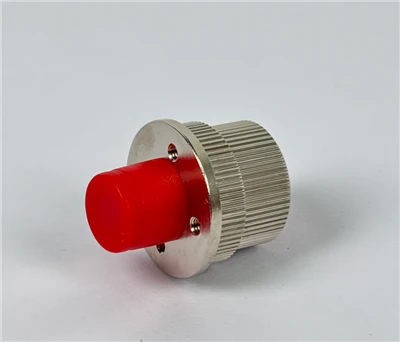
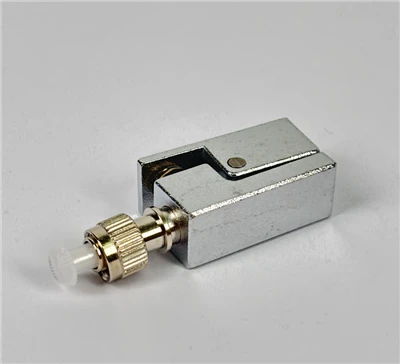
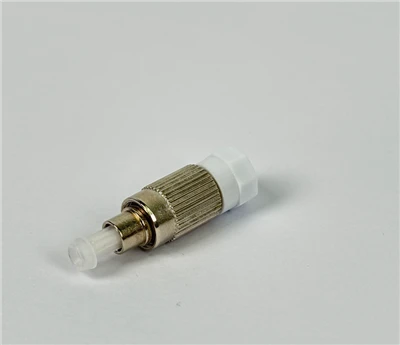
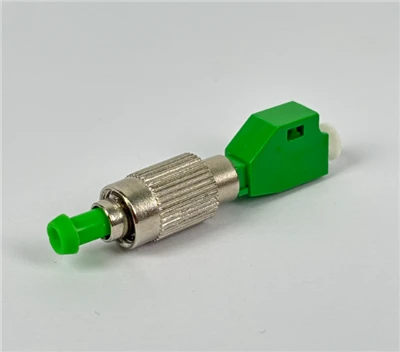
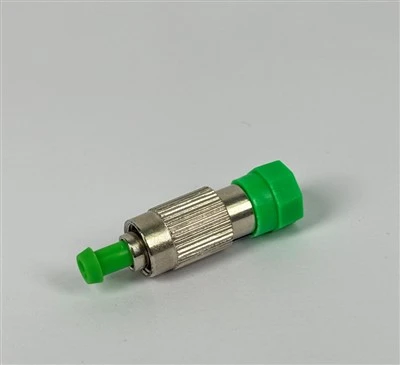
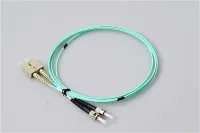
FC and ST connectors are two round fiber optic connectors that often get confused during field identification, procurement, and maintenance. Both have cylindrical metal bodies and a 2.5 mm ceramic ferrule, so telling them apart at a quick glance is not always easy - especially if you are not working with them every day.
The fastest way to distinguish them is to look at how the connector locks into the fiber optic adapter. An FC connector uses a threaded screw-on coupling nut: you rotate it several full turns to secure the connection. An ST connector uses a bayonet-style twist lock: you push it in and give it roughly a quarter turn to lock it in place. Once you focus on this one detail, identification becomes straightforward.
This guide walks through the physical differences between FC and ST fiber connectors, how to identify each one in the field, where they are typically used, and how to decide which one fits your application.

FC vs ST Fiber Connector: The Short Answer
An FC fiber optic connector (Ferrule Connector) has a round metal body with a threaded coupling nut. You screw it onto the adapter to form a firm, stable optical connection. The design was originally developed by NTT (Nippon Telegraph and Telephone) in the late 1970s and was the first fiber connector to use a ceramic ferrule, according to its Wikipedia entry.

An ST fiber optic connector (Straight Tip) also has a round body, but it locks with a bayonet-style mechanism similar to a BNC connector. AT&T developed the ST connector shortly after the FC type appeared. You insert it, align the key slot, and twist to lock - no threading required.
| Feature | FC Connector | ST Connector |
|---|---|---|
| Easiest identification | Threaded screw-on nut | Push-and-twist bayonet lock |
| Locking action | Multiple full rotations | Roughly a quarter turn |
| Ferrule size | 2.5 mm zirconia ceramic | 2.5 mm zirconia ceramic |
If the connector requires several full rotations to tighten, it is almost certainly FC. If it locks after a short push and twist, it is almost certainly ST.
What Is an FC Fiber Connector?
FC stands for Ferrule Connector, though in the industry you may also hear it called Fiber Channel or Field-Assembly Connector. The connector features a stainless steel or nickel-plated body, a keyed alignment structure, and a threaded coupling nut that screws onto the mating adapter.

The FC connector is standardized under TIA-604-4 (FOCIS 4) and IEC 61754-13. Its threaded design provides excellent mechanical isolation, which is why it has been widely used in telecom transmission equipment, optical test instruments such as OTDRs and power meters, and optical distribution frames (ODFs) where connections stay in place for long periods.
However, the screw-on mechanism makes FC slower to install and remove compared to push-pull or bayonet-style connectors. In high-density environments like modern data centers, FC has largely been replaced by smaller form-factor connectors such as LC connectors.

How to Identify an FC Connector in the Field
When you pick up a round metal fiber connector and are not sure whether it is FC or ST, follow this check:
- Look at the coupling nut. FC has a wide, knurled threaded nut. If you see screw threads, that is your primary indicator.
- Try to lock it. If you need to rotate the nut several full turns before it seats firmly, it is FC.
- Check the adapter. An FC adapter has internal threads. An ST adapter has bayonet slots - the two are visually distinct once you know what to look for.
Technician Tip: FC connectors have an alignment key that must be positioned correctly before you begin threading. If you force the connector without aligning the key, you risk scratching the fiber end face. Take a moment to seat the key into the adapter slot before you start rotating.
What Is an ST Fiber Connector?
ST stands for Straight Tip. It uses a spring-loaded bayonet coupling mechanism - conceptually similar to the BNC connectors used in coaxial A/V applications. The ST connector is standardized under TIA-604-2 (FOCIS 2) and IEC 61754-2.
ST connectors were among the earliest fiber connectors to see widespread adoption in LAN environments. Through the 1990s and into the early 2000s, they were a common choice for multimode campus networks, building backbone cabling, and fiber distribution panels. While newer connector types have taken over in most new installations, ST remains present in many legacy networks that are still actively maintained. For more background on the ST connector's role and applications, see our guide to the purpose of ST connectors.
How to Identify an ST Connector in the Field
- Look for the bayonet mechanism. ST connectors have visible locking pins or a tab on the outer body, and the adapter has corresponding slots.
- Try the connection. Insert the connector straight into the adapter and give it a short twist. If it locks with roughly a quarter turn and you feel a click or positive stop, it is ST.
- Check the spring action. ST connectors are spring-loaded. If you press the connector forward and it springs back slightly when released, that confirms ST.
Technician Tip: ST connectors must be properly seated to achieve low loss. If your optical power reading looks higher than expected after connecting, remove the ST connector and reconnect it - making sure the bayonet tab fully engages the adapter slot. A partially locked ST can introduce significant insertion loss.
FC vs ST Connector: Detailed Comparison
| Feature | FC Connector | ST Connector |
|---|---|---|
| Full name | Ferrule Connector | Straight Tip |
| Developer | NTT (Japan) | AT&T (USA) |
| Locking mechanism | Threaded screw-on coupling | Bayonet-style twist lock |
| Ferrule diameter | 2.5 mm | 2.5 mm |
| Body material | Nickel-plated or stainless steel | Metal with spring-loaded mechanism |
| Installation speed | Slower (multiple rotations) | Faster (push and quarter-turn) |
| Vibration resistance | Excellent - threaded coupling resists loosening | Good - but bayonet can disengage under sustained vibration |
| Typical fiber mode | Often single-mode; also multimode | Often multimode; also single-mode |
| Common applications | Telecom, test equipment, ODF, industrial | Legacy LAN, campus networks, distribution panels |
| Industry standard | TIA-604-4, IEC 61754-13 | TIA-604-2, IEC 61754-2 |
| Best suited for | Fixed, long-term connections in vibration-prone environments | Patch panels and environments requiring frequent reconnection |
| Not ideal for | High-density patching with frequent changes | High-vibration environments with no secondary retention |
FC vs ST: Locking Mechanism Compared
The locking mechanism is the single most important difference between FC and ST, and it drives most of the practical trade-offs between the two connectors.
The FC connector's threaded coupling works like a bolt-and-nut system. The coupling nut has precision threads that mate with the adapter body. As you rotate the nut, it draws the ferrule forward until the fiber end face is pressed firmly against the mating fiber inside the adapter. This threaded engagement means the connector will not loosen on its own - even in environments with vibration, such as telecom equipment rooms or industrial machinery enclosures.
The ST connector's bayonet mechanism works differently. You align the key tab with the adapter slot, push the connector forward, and twist. The bayonet pins lock into grooves in the adapter, and a spring inside the connector maintains forward pressure on the ferrule. This makes connection and disconnection much faster - a clear advantage in fiber distribution areas or patch panels where technicians may need to reconfigure links regularly.
The trade-off is straightforward: FC offers stronger mechanical retention at the cost of speed; ST offers faster operation at the cost of some vibration resistance.
FC vs ST: Which Is Easier to Install?
In a maintenance or patching scenario where you are making several connections in a row, the ST connector is noticeably faster. Push, twist, done. An experienced technician can connect an ST in a few seconds.
FC takes longer because you need to align the key, start the thread, and rotate the coupling nut until it is firmly seated. In a rack with dozens of FC ports, the cumulative time difference adds up. However, for a fixed point-to-point link - for example, connecting an OTDR to a fiber under test - the extra seconds are irrelevant, and the secure threaded connection is a genuine benefit.
Ordering Tip: If your equipment has an FC port on one end and an ST patch panel on the other, do not try to force an adapter mismatch. Order an FC-to-ST hybrid patch cord with the correct fiber mode and polish type. This avoids adapter stacking, which can increase insertion loss and introduce additional reflection points.
FC vs ST: Typical Applications
Where FC Connectors Are Commonly Used
FC connectors remain in active service in several areas where the threaded coupling provides a clear advantage:
- Telecom transmission equipment - many central office devices still use FC interfaces for trunk-side connections.
- Optical test instruments - OTDRs, optical power meters, and light sources frequently come with FC ports because the screw-on connection minimizes measurement variability during repeated testing.
- Optical distribution frames - in telecom and CATV headend environments, FC adapters are still common on ODF patch panels where connections remain in place for months or years.
- Industrial and military fiber systems - environments with sustained vibration benefit from the threaded retention.
If you are sourcing FC connectors or assemblies for any of these applications, review our FC fiber patch cord and FC fiber pigtail product pages for specifications and customization options.
Where ST Connectors Are Commonly Used
ST connectors are most often encountered in legacy infrastructure and certain distribution environments:
- Multimode LAN backbone - many office buildings and campus networks built in the 1990s and 2000s used ST connectors with 62.5/125 µm or 50/125 µm multimode fiber.
- Fiber distribution panels and wall outlets - fiber terminal boxes in older installations frequently use ST adapters.
- Maintenance and like-for-like replacement - when replacing a failed patch cord or pigtail in a network that already uses ST, matching the existing connector type is usually the safest approach.
For ST replacement needs, see our ST fiber patch cord and ST fiber adapter options.
Can You Connect FC and ST Ports Together?
No - FC and ST connectors cannot be directly mated. Although both use a 2.5 mm ferrule, their connector housings and adapter interfaces are mechanically incompatible. An FC connector's threaded nut will not engage with an ST adapter's bayonet slots, and vice versa.

If you need to link an FC port to an ST port, you have two practical options:
- FC-to-ST hybrid patch cord - a single cable with an FC connector on one end and an ST connector on the other. This is the cleanest solution and introduces only one mated pair per end.
- FC-to-ST hybrid adapter - a bulkhead coupling that accepts an FC connector on one side and an ST connector on the other. Useful when you already have patch cords terminated on each side.
Before ordering either option, confirm three things: the fiber mode (single-mode or multimode), the end-face polish type (PC, UPC, or APC), and the cable structure (simplex or duplex). Mismatching any of these will cause excess loss or damage to the fiber end face.
3-Step Field Identification: FC or ST?

When you encounter a round metal fiber connector and need to identify it quickly, use this three-step process:
Step 1: Check the coupling mechanism. Look at how the connector body interfaces with the adapter. Threaded nut = FC. Bayonet tab and slots = ST.
Step 2: Test the locking action. If you need to rotate the connector several full turns to tighten it, that confirms FC. If it locks with a short push and twist (roughly a quarter turn), that confirms ST.
Step 3: Read the connector or cable marking. Many patch cords and pigtails have the connector type printed on the cable jacket or boot. Look for markings such as "FC/UPC," "FC/APC," "ST/UPC," or "ST/PC." If markings are absent, the locking mechanism test from Step 2 is definitive.
For a broader overview of how different fiber connectors are identified, the Fiber Optic Association maintains a useful visual connector identification guide.
FC vs ST vs LC vs SC: When to Consider Other Connectors

FC and ST are both established connector types, but they are not always the right choice for a new installation. Here is a quick decision framework:
| Scenario | Recommended Connector | Reason |
|---|---|---|
| Existing FC equipment or ODF | FC | Match the installed base |
| Existing ST patch panel or LAN | ST | Match the installed base |
| FC device to ST panel | FC-ST hybrid patch cord | Bridge incompatible interfaces |
| New data center or high-density switch | LC | Small form factor, high port density |
| FTTH access network or PON | SC | Push-pull mechanism, widely used in FTTH |
| High-fiber-count trunk cabling | MPO/MTP | Multi-fiber termination for parallel optics |
The right connector is not necessarily the newest one - it is the one that matches your equipment interfaces, adapter panels, fiber type, and maintenance workflow. For a broader comparison of all major fiber optic connector types, see our dedicated guide.
Common Mistakes When Working with FC and ST Connectors

Judging Only by the Round Shape
Both FC and ST have round metal bodies - and so do some specialty connectors like SMA. Looking at the body shape alone will lead to mistakes. Always check the locking mechanism first.
Ignoring the Adapter Match
An FC connector requires an FC adapter with internal threads. An ST connector requires an ST adapter with bayonet slots. If the connector does not seat properly in the adapter, do not force it - you may damage the ferrule end face or the adapter alignment sleeve.
Confusing Connector Type with Polish Type
FC and ST describe the connector's mechanical structure. PC, UPC, and APC describe the fiber end-face polish geometry. These are independent specifications. An FC connector can be FC/PC, FC/UPC, or FC/APC. An ST connector can be ST/PC or ST/UPC. APC polish on ST connectors is uncommon but not impossible. Always confirm both the connector type and the polish type before ordering.
Mixing Single-Mode and Multimode Without Checking
FC and ST connectors are available in both single-mode and multimode versions. The ferrule bore size differs (typically 126 µm for single-mode 9/125 fiber and 127 µm for multimode 50/125 or 62.5/125 fiber). Using the wrong type can cause high insertion loss or unreliable connections. Confirm fiber mode, core size, and wavelength requirements before replacing any connector or patch cord.
Replacing One Component Without Checking the Full Link
A fiber link includes connectors, adapters, patch cords, pigtails, splice trays, and equipment ports. Replacing a single patch cord without verifying the connector type, polish, fiber mode, and cable structure across the entire link can introduce compatibility problems that are difficult to troubleshoot later.
Ordering Checklist for FC and ST Patch Cords
Before purchasing FC patch cords or ST patch cords, verify the following:
- Connector type on each end - FC-FC, ST-ST, FC-ST, FC-SC, ST-LC, or another combination.
- Fiber mode - single-mode (OS2, 9/125 µm) or multimode (OM1, OM2, OM3, OM4, OM5).
- Polish type - PC, UPC, or APC. Mating an APC connector with a UPC adapter will cause high back reflection and possible end-face damage.
- Cable length - measure the routing path and add enough slack for dressing and strain relief.
- Cable structure - simplex (one fiber) or duplex (two fibers).
- Jacket type - indoor (PVC, LSZH), outdoor, riser-rated, plenum-rated, or armored, depending on the installation environment.
- Adapter and panel compatibility - confirm that the adapters in your existing panel or ODF match the connector type you are ordering.
Ordering Tip: If you are managing a maintenance inventory for an older network with mixed FC and ST ports, keep a small stock of FC-to-ST hybrid patch cords alongside standard FC-FC and ST-ST cords. This avoids emergency procurement delays when a cross-connect is needed.
FAQ
Can I plug an ST connector into an FC adapter?
No. The FC adapter has internal screw threads, while the ST connector uses a bayonet tab. The two mechanisms are not compatible. You need either a hybrid adapter or a hybrid patch cord to bridge FC and ST interfaces.
Do FC and ST connectors use the same ferrule size?
Yes. Both FC and ST connectors typically use a 2.5 mm zirconia ceramic ferrule, the same diameter used by SC connectors. However, the connector housing, locking mechanism, and adapter interface are all different, so they are not interchangeable despite sharing the same ferrule size.
Is FC or ST better for single-mode fiber?
Both can be used with single-mode fiber. FC connectors have historically been more common in single-mode telecom and test environments, partly because the threaded coupling provides a stable, repeatable connection - which matters for measurement accuracy. ST connectors have been more associated with multimode LAN networks, though single-mode ST patch cords and pigtails are available. The choice depends on your equipment ports and existing infrastructure more than on the fiber mode itself.
Are FC connectors obsolete?
Not yet. FC connectors are declining in new installations because LC and SC connectors offer faster connection, higher port density, and lower cost. However, FC remains actively used in telecom legacy systems, optical test equipment, military fiber networks, and certain industrial applications. If your equipment has FC ports, it makes sense to use FC connectors rather than introducing adapters unnecessarily.
Are ST connectors still used in modern networks?
ST connectors are rarely specified in new network designs. However, they are still widely present in existing campus LANs, building backbones, and fiber distribution panels installed before the mid-2010s. For maintenance and replacement work on these networks, ST connectors remain a regular procurement item.
Why are FC connectors common on test equipment?
Optical test instruments like OTDRs and power meters need stable, repeatable connections because even small changes in insertion loss affect measurement accuracy. The FC connector's threaded coupling holds the ferrule firmly in place and eliminates the slight play that can occur with push-pull or bayonet connectors. This makes FC a preferred interface for test ports, although many newer instruments now also offer SC or LC options.
What is the difference between FC and SC connectors?
FC uses a threaded screw-on coupling, while SC uses a push-pull latching mechanism. SC is generally faster to connect and more common in FTTH and PON systems. For a detailed comparison, see our article on the difference between SC and FC fiber connectors.
Conclusion
FC and ST connectors look similar because both have round metal bodies and a 2.5 mm ferrule. But the difference is clear once you check the locking mechanism: FC screws on with a threaded nut; ST locks with a bayonet twist.
FC is the better choice when you need a firm, vibration-resistant connection for a fixed link - telecom trunk ports, test equipment, ODF patch panels. ST is the practical choice when you are maintaining a legacy LAN or distribution network that already uses ST adapters and need quick connection and disconnection.
Before ordering or replacing any connector, confirm the full link: connector type, polish type, fiber mode, cable length, jacket rating, and adapter compatibility. Getting these details right at the procurement stage prevents installation delays and avoids performance problems in the field. If you need help selecting the right fiber optic connector or patch cord configuration for your project, our technical team can assist with specification review and custom orders.