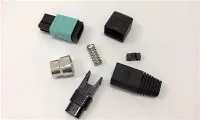
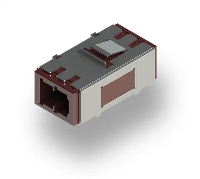
Hey there! As a supplier of Fiber Optic MU Adapters, I've seen firsthand how crucial it is to get the installation right, especially in high - density environments. In this blog, I'm gonna share some top - notch installation tips for these adapters.
First off, let's talk about what a Fiber Optic MU Adapter is. It's a small but mighty component in fiber optic networks. If you're interested in learning more about it, you can check out our Fiber Optic MU Adapter page. It gives you all the details about its features and specifications.
Pre - installation Preparation
Before you even start the installation, there are a few things you need to do.
Inspect the Adapter
When you receive your Fiber Optic MU Adapters, give them a good once - over. Look for any signs of damage, like cracks or scratches. A damaged adapter can lead to signal loss or poor performance in your network. We take great care in manufacturing these adapters, but it's always good to double - check.
Clean the Components
Cleanliness is super important in fiber optic installations. Use a lint - free cloth and a suitable cleaning solution to clean both the adapter and the fiber optic connectors. Dust, dirt, or oil on the connectors can cause reflection and attenuation of the light signal. It's like having a dirty window; the light can't pass through clearly.
Plan the Layout
In a high - density environment, space is at a premium. Plan out where you're going to install the adapters. Consider factors like cable management, access for future maintenance, and heat dissipation. You don't want to end up in a situation where you can't reach a particular adapter or where the cables are all tangled up.

Installation Steps
Mounting the Adapter
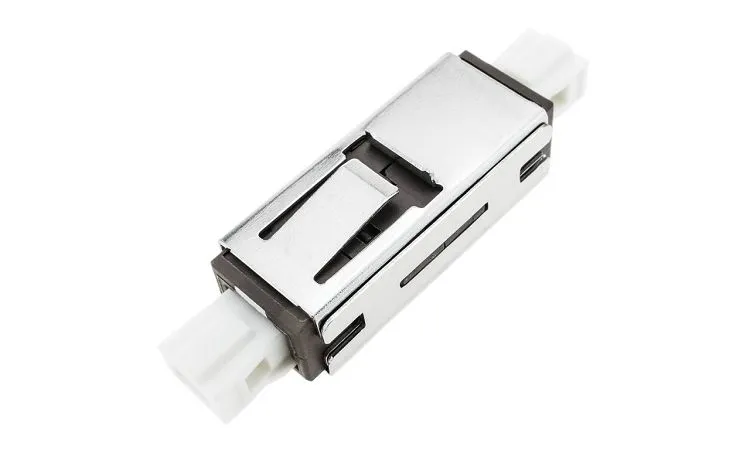
Most Fiber Optic MU Adapters come with mounting holes or brackets. Use the appropriate tools to securely mount the adapter in the chosen location. Make sure it's level and firmly attached. A loose adapter can cause vibrations, which may disrupt the signal.
Connecting the Fibers
When connecting the fiber optic cables to the adapter, be gentle. Align the connectors carefully with the adapter ports. The MU connectors are relatively small, so it takes a bit of precision. Insert the connectors fully into the adapter until you feel a slight click. This indicates that they are properly seated.
Cable Management
In a high - density environment, cable management is key. Use cable ties or clips to organize the cables. Keep the cables away from sharp edges or objects that could damage them. You can also use cable trays or ducts to keep the cables neatly arranged. This not only makes the installation look professional but also makes it easier to troubleshoot if there are any issues later on.
Testing the Connection
Once you've connected all the cables, it's time to test the connection. Use a fiber optic tester to check the signal strength and quality. Look for any signs of signal loss or interference. If you detect a problem, go back and check the connections, make sure the cables are properly seated, and that the adapter is clean.
Tips for High - Density Environments
Use of Patch Panels
In high - density environments, patch panels are a great way to organize multiple adapters. They provide a centralized location for connecting and managing fiber optic cables. You can choose from different types of patch panels, depending on your specific needs. For example, some patch panels are designed for easy front - access, which is convenient for maintenance.
Cooling Considerations
With so many components packed closely together, heat can become a problem. Make sure there is adequate ventilation in the area where the adapters are installed. You may need to install fans or cooling systems to keep the temperature within the acceptable range. High temperatures can affect the performance of the fiber optic components and even cause permanent damage.
Labeling
Labeling is often overlooked but is extremely important in high - density environments. Label each adapter and cable clearly. This makes it easy to identify which cable goes where and which adapter is connected to which device. It saves a lot of time when you need to make changes or troubleshoot the network.
Comparing with Other Adapters
You might be wondering how the Fiber Optic MU Adapter compares to other types of adapters, like the Fiber Optic SC Adapter. The SC adapters are larger and more commonly used in some applications. However, the MU adapters are more compact, which makes them ideal for high - density environments where space is limited.
Another option you might consider is our Factory Price Ftth Networking Lc - lc Duplex Fiber Adapter. These adapters are great for Fiber to the Home (FTTH) applications. They offer a cost - effective solution for connecting multiple fiber optic cables.
Conclusion
Installing Fiber Optic MU Adapters in a high - density environment requires careful planning, precision, and attention to detail. By following these tips, you can ensure a successful installation that provides reliable performance. If you have any questions or need more information about our Fiber Optic MU Adapters or other fiber optic products, don't hesitate to get in touch. We're here to help you make the right choice for your network. Whether you're setting up a new network or upgrading an existing one, we have the products and expertise to meet your needs. Reach out to us for a quote or to discuss your specific requirements. Let's work together to build a high - performance fiber optic network!
References
- "Fiber Optic Installation Handbook"
- Industry standards for fiber optic components and installations
So, if you're in the market for Fiber Optic MU Adapters or any other fiber optic products, feel free to reach out. We're ready to assist you with your procurement needs and ensure you get the best products for your network.