Upgrading a network using Fiber Optic MPO Patchcords can significantly enhance network performance, reliability, and scalability. As a supplier of Fiber Optic MPO Patchcords, I am well - versed in the process and the benefits these patchcords bring to network upgrades. In this blog, I will guide you through the steps of upgrading a network with Fiber Optic MPO Patchcords.
Understanding Fiber Optic MPO Patchcords
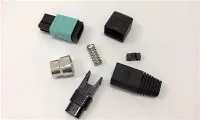
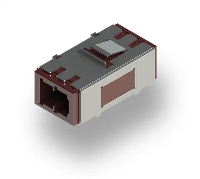
Fiber Optic MPO (Multi - Fiber Push - On) Patchcords are high - density, multi - fiber cables that are designed for use in data centers, telecommunications networks, and other high - performance networking environments. They feature MPO connectors, which can accommodate multiple fibers in a single connector, allowing for quick and easy installation and connection of multiple fibers at once.
The MPO connectors typically come in different configurations, such as 8 - fiber, 12 - fiber, 24 - fiber, and even higher counts. These patchcords support various fiber types, including single - mode and multi - mode fibers, and can be used for different applications, such as high - speed data transmission, video distribution, and voice communication.
Assessing Your Network Requirements
Before starting the network upgrade, it is crucial to assess your current network requirements and future growth plans. Consider factors such as the existing network infrastructure, the types of applications running on the network, the expected data traffic volume, and the required bandwidth.
For example, if you are running data - intensive applications like big data analytics or cloud computing, you will need a high - bandwidth network that can support large amounts of data transfer. In such cases, Fiber Optic MPO Patchcords with a higher fiber count and better performance characteristics may be required.
Additionally, evaluate the physical layout of your network, including the distance between network devices, the number of connection points, and the available space for cable management. This will help you determine the appropriate length and quantity of Fiber Optic MPO Patchcords needed for the upgrade.
Planning the Upgrade
Once you have assessed your network requirements, it's time to plan the upgrade process. Start by creating a detailed network topology diagram that shows the existing network infrastructure and the proposed changes. This diagram will serve as a roadmap for the upgrade and help you visualize the new network layout.
Identify the specific locations where the Fiber Optic MPO Patchcords will be installed. This may include data centers, server rooms, network closets, or other areas where network devices are located. Make sure to consider the cable routing paths and ensure that there is sufficient space for the patchcords to be installed without causing any interference or congestion.
Next, determine the type and quantity of Fiber Optic MPO Patchcords required for the upgrade. Consider factors such as the fiber count, the type of fiber (single - mode or multi - mode), the connector type (UPC or APC), and the length of the patchcords. You can refer to our product catalog for a wide range of options, including the FIBER OPTIC PATCH CORD MTP TO LC UPC 8CORE OM4 3.0MM.
Preparing for Installation
Before installing the Fiber Optic MPO Patchcords, it is essential to prepare the installation area. This includes cleaning the connection points, such as the MPO ports on network devices and patch panels, to remove any dust, dirt, or debris that could affect the performance of the patchcords.
Use appropriate cleaning tools, such as lint - free wipes and fiber optic cleaners, to clean the connectors. Make sure to follow the manufacturer's instructions for cleaning to avoid damaging the connectors.


Additionally, gather all the necessary installation tools, such as cable cutters, strippers, crimpers, and testing equipment. Having the right tools on hand will ensure a smooth and efficient installation process.
Installing the Fiber Optic MPO Patchcords
When installing the Fiber Optic MPO Patchcords, follow these steps:
- Route the cables: Carefully route the patchcords along the pre - determined cable paths, making sure to avoid sharp bends or kinks that could damage the fibers. Use cable management solutions, such as cable trays, racks, and ties, to keep the cables organized and protected.
- Connect the patchcords: Connect one end of the Fiber Optic MPO Patchcord to the MPO port on the network device or patch panel. Make sure to align the key on the connector with the keyway on the port to ensure a proper connection. Gently push the connector into the port until it clicks into place.
- Repeat for all connections: Repeat the connection process for all the required connection points, making sure to label each patchcord for easy identification and troubleshooting.
- Test the connections: After installing all the patchcords, use fiber optic testing equipment, such as an optical time - domain reflectometer (OTDR) or a light source and power meter, to test the connections. This will help you verify the performance of the patchcords and ensure that there are no issues with the installation.
Post - Installation Testing and Optimization
Once the Fiber Optic MPO Patchcords are installed and tested, it is important to perform post - installation testing and optimization. This includes monitoring the network performance, checking for any errors or packet loss, and adjusting the network settings as needed.
Use network monitoring tools to track the network traffic, bandwidth utilization, and other performance metrics. This will help you identify any bottlenecks or issues in the network and take appropriate measures to optimize the performance.
If you encounter any problems during the testing process, such as low signal strength or high bit error rate, refer to the troubleshooting guide provided by the patchcord manufacturer. In some cases, it may be necessary to re - clean the connectors, check the cable routing, or replace the patchcords.
Benefits of Using Fiber Optic MPO Patchcords in Network Upgrades
There are several benefits to using Fiber Optic MPO Patchcords in network upgrades:
- High - density connectivity: MPO connectors can accommodate multiple fibers in a single connector, allowing for high - density connectivity in a limited space. This is particularly beneficial in data centers where space is often at a premium.
- High - speed data transmission: Fiber Optic MPO Patchcords support high - speed data transmission rates, such as 10Gbps, 40Gbps, 100Gbps, and even higher. This makes them ideal for applications that require fast and reliable data transfer.
- Scalability: MPO patchcords can be easily added or removed from the network, making it easy to scale the network as your business grows. You can simply add more patchcords to increase the network capacity without having to make significant changes to the existing infrastructure.
- Reliability: Fiber optic cables are more reliable than traditional copper cables, as they are less susceptible to interference, electromagnetic radiation, and environmental factors. This results in a more stable and consistent network performance.
Additional Fiber Optic Patchcord Options
In addition to Fiber Optic MPO Patchcords, we also offer a variety of other fiber optic patchcords to meet your specific network needs. For example, our Fiber Optic FC Patch Cable is a popular choice for applications that require a more secure and stable connection. The FC connectors are known for their excellent performance and reliability.
Another option is our Fiber Optic LC Fiber Jumper, which is widely used in local area networks (LANs) and data centers. The LC connectors are small in size and offer high - density connectivity, making them suitable for applications where space is limited.
Conclusion
Upgrading a network using Fiber Optic MPO Patchcords is a smart investment that can bring significant benefits to your business. By following the steps outlined in this blog, you can ensure a successful network upgrade that improves network performance, reliability, and scalability.
If you are interested in upgrading your network with Fiber Optic MPO Patchcords or any other fiber optic products, please feel free to contact us for more information. Our team of experts is ready to assist you with your network upgrade needs and help you choose the right products for your specific requirements.
References
- "Fiber Optic Cabling Installation and Testing Guide" by the Telecommunications Industry Association (TIA).
- "Network Design and Implementation Best Practices" by Cisco Systems.
- "Fiber Optic Technology Handbook" by the International Electrotechnical Commission (IEC).