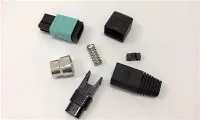
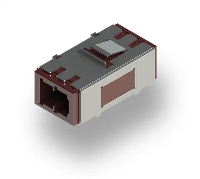
Hey there! As a supplier of Fiber Optic MTRJ Adapters, I've seen firsthand how integrating these adapters into an existing Local Area Network (LAN) can be a game - changer. In this blog, I'm gonna walk you through the whole process, step by step.
Why Consider a Fiber Optic MTRJ Adapter?
Before we dive into the integration process, let's quickly talk about why you might want to use a Fiber Optic MTRJ Adapter in your LAN. These adapters are compact and easy to install. They offer high - speed data transmission, which is crucial in today's fast - paced digital world. Whether you're running a small business LAN or a large corporate network, the MTRJ adapter can boost your network's performance.
Assessing Your Existing LAN
The first step in integrating a Fiber Optic MTRJ Adapter is to take a good look at your current LAN. Check the type of network cables you're using. Are they copper cables or fiber optic cables? If you're using copper cables, you'll need to make some adjustments as MTRJ adapters are designed for fiber optic connections.
Also, assess the network devices you have. Make sure they support fiber optic connections. Some older routers, switches, or servers might not have fiber optic ports. If that's the case, you'll need to either upgrade these devices or use media converters to bridge the gap between copper and fiber optic connections.
Gathering the Necessary Tools and Materials
Once you've assessed your LAN, it's time to gather the tools and materials you'll need for the integration. Of course, you'll need the Fiber Optic MTRJ Adapters. Make sure you get the right quantity based on your network requirements.
You'll also need fiber optic cables. These cables come in different lengths and types, so choose the ones that are suitable for your LAN setup. Additionally, you'll need tools like fiber optic strippers, cleavers, and fusion splicers (if you're splicing the cables). Don't forget to have some cleaning kits on hand to keep the fiber optic connectors clean.
Preparing the Work Area
Before you start the actual installation, prepare a clean and organized work area. Fiber optic cables and connectors are very sensitive to dust and dirt. A dirty work area can cause signal loss and other network issues.
Clear the area of any debris and make sure you have enough space to work comfortably. You might also want to use an anti - static mat to prevent static electricity from damaging the components.


Installing the Fiber Optic MTRJ Adapters
Now, let's get to the fun part - installing the adapters. First, identify the network devices where you'll be installing the MTRJ adapters. These could be routers, switches, or servers.
Carefully remove the protective caps from the MTRJ adapters. Then, align the adapter with the fiber optic port on the network device. Gently insert the adapter into the port until it clicks into place. Make sure it's properly seated to avoid any loose connections.
If you're using multiple MTRJ adapters, repeat the process for each one. Label the adapters and the connected cables to keep track of your network setup.
Connecting the Fiber Optic Cables
After installing the adapters, it's time to connect the fiber optic cables. Strip the outer jacket of the cable using a fiber optic stripper. Be careful not to damage the inner fibers.
Next, use a cleaver to cut the fiber at a 90 - degree angle. A clean cut is essential for good signal transmission. Then, insert the fiber into the MTRJ connector. If you're using a pre - terminated cable, simply plug it into the adapter.
Once the cable is connected, use a cleaning kit to clean the connector. This will remove any dust or debris that could interfere with the signal.
Testing the Connection
After connecting all the cables and adapters, it's important to test the connection. You can use a fiber optic tester to check the signal strength and quality. Make sure the signal is within the acceptable range.
If you encounter any issues, such as low signal strength or intermittent connectivity, check the connections again. Make sure the adapters are properly seated and the cables are not damaged.
Troubleshooting Common Issues
Even if you follow all the steps correctly, you might still encounter some issues. Here are some common problems and how to solve them:
Low Signal Strength
- Check if the fiber optic cables are bent or kinked. A sharp bend can cause signal loss.
- Clean the connectors again. Sometimes, a small amount of dirt can cause a significant drop in signal strength.
- Make sure the MTRJ adapters are compatible with the network devices and the fiber optic cables.
Intermittent Connectivity
- Check for loose connections. Make sure the adapters are firmly seated in the ports and the cables are properly plugged into the adapters.
- Look for any signs of damage to the cables or adapters. If you find any damaged components, replace them.
Other Fiber Optic Adapter Options
If you're interested in exploring other fiber optic adapter options, we also offer Fiber Optic Sc Adapter and Fiber Optic E2000 Adapter. These adapters have their own unique features and benefits. For example, the Factory Price Ftth Networking Lc - lc Duplex Fiber Adapter is a great choice for FTTH networking.
Conclusion
Integrating a Fiber Optic MTRJ Adapter into an existing LAN might seem like a daunting task, but with the right approach and some patience, it can be a smooth process. By following the steps outlined in this blog, you can enhance your network's performance and enjoy high - speed data transmission.
If you're interested in purchasing Fiber Optic MTRJ Adapters or have any questions about the integration process, feel free to reach out. We're here to help you make the most of your network infrastructure.
References
- Fiber Optic Installation Handbook
- LAN Networking Best Practices Guide