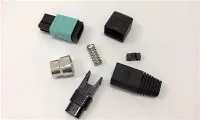
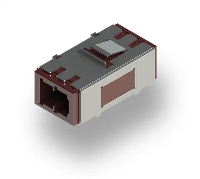
Hey there, fellow tech enthusiasts! I'm an expert from a Fiber Optic MU Adapter supplier, and today I'm gonna walk you through the process of installing a Fiber Optic MU Adapter in a patch panel. Whether you're a newbie in the networking field or a seasoned pro looking for a refresher, this guide is for you.
Why Fiber Optic MU Adapters?
Before we jump into the installation process, let's quickly talk about why Fiber Optic MU Adapters are so great. These adapters are super compact, which means you can fit a whole bunch of them in a patch panel. They're also highly reliable, ensuring a stable and high - speed connection for your fiber optic network. With the ever - increasing demand for faster data transfer, MU Adapters are becoming more and more popular in both small - scale and large - scale networking setups.
What You'll Need
First things first, let's gather all the tools and materials you'll need for this installation:
- Fiber Optic MU Adapters: Obviously, you'll need the adapters themselves. Make sure you get high - quality ones from a trusted supplier like us.
- Patch Panel: This is where you'll be installing the adapters. Choose a patch panel that's compatible with the MU Adapters.
- Screwdriver: A small Phillips or flat - head screwdriver, depending on the type of screws used in your patch panel.
- Cleaning Kit: Fiber optic cables are very sensitive to dust and debris. A cleaning kit with lint - free wipes and optical cleaner will help keep your connections clean.
- Fiber Optic Cables: You'll need these to test the connection after installation.
Step 1: Prepare the Patch Panel
The first step is to prepare the patch panel. Start by finding a suitable location for it. It should be in a well - ventilated area away from sources of heat and moisture. Once you've found the right spot, mount the patch panel on the wall or in a rack using the appropriate mounting hardware.
Next, open the patch panel. Most patch panels have a removable front cover. Use your screwdriver to remove the screws holding the cover in place and set it aside.
Step 2: Plan the Adapter Placement
Before you start installing the adapters, it's a good idea to plan where you want to place them. Consider the layout of your network and the future expansion needs. You might want to group the adapters based on the type of connections or the location of the devices they'll be connected to.
Mark the spots on the patch panel where you'll be installing the MU Adapters. You can use a pencil or a marker for this. Make sure the markings are clear and accurate.
Step 3: Install the Fiber Optic MU Adapters
Now it's time to install the adapters. Take one of the MU Adapters and align it with the marked spot on the patch panel. Most MU Adapters have tabs or holes that fit into corresponding slots or holes on the patch panel.
Gently press the adapter into place. You should hear a click or feel a slight resistance when it's properly seated. If the adapter doesn't fit easily, double - check the alignment and make sure there are no obstructions in the slot.
Once the adapter is in place, use your screwdriver to secure it with the screws provided. Make sure the screws are tightened just enough to hold the adapter firmly in place, but don't over - tighten them as this could damage the adapter or the patch panel.
Repeat this process for each of the MU Adapters you need to install. Take your time and make sure each adapter is installed correctly.
Step 4: Clean the Adapters and Cables
After all the adapters are installed, it's important to clean them and the fiber optic cables. Use the lint - free wipes and optical cleaner from your cleaning kit to gently clean the inside of the adapters. This will remove any dust or debris that could interfere with the connection.
Also, clean the ends of the fiber optic cables that you'll be using to test the connection. Wipe the connectors with a clean, dry part of the lint - free wipe to remove any fingerprints or dirt.
Step 5: Connect the Fiber Optic Cables
Now that the adapters are installed and clean, it's time to connect the fiber optic cables. Take one of the cables and insert the connector into the MU Adapter. You should feel a slight resistance as the connector engages with the adapter.
Gently push the connector in until it's fully seated. Make sure it's properly aligned and there are no gaps between the connector and the adapter.
Repeat this process for each of the cables you want to connect. You can test the connection by checking if the lights on the network devices connected to the cables are lit up. If the lights are on, it means the connection is working properly.
Step 6: Test the Connection
Once all the cables are connected, it's time to test the connection. You can use a fiber optic tester to check the signal strength and quality of the connection. Connect the tester to one end of the cable and check the readings.
If the readings are within the acceptable range, then your installation is successful. If not, double - check the connections, make sure the adapters are properly installed, and clean the connectors again.


Troubleshooting
Sometimes, you might run into some issues during the installation or testing process. Here are some common problems and their solutions:
- No Signal: If you're not getting a signal, check the connections first. Make sure the cables are properly inserted into the adapters and that the adapters are installed correctly. Also, check if the network devices are powered on and functioning properly.
- Weak Signal: A weak signal could be caused by dirty connectors or a damaged cable. Clean the connectors again and try a different cable if possible.
- Adapter Not Fitting: If the adapter doesn't fit into the patch panel, check the alignment and make sure there are no obstructions. If the problem persists, contact your supplier for assistance.
Conclusion
Installing a Fiber Optic MU Adapter in a patch panel might seem a bit daunting at first, but with the right tools and a little patience, it's a task that you can easily accomplish. By following the steps outlined in this guide, you can ensure a successful installation and a reliable fiber optic network.
If you're in the market for high - quality Fiber Optic MU Adapters or other fiber optic products like Fiber Optic Fc Adaptor, Fiber Optic Sc Adapter, or Optical Fiber Adaptor Mtp / Mpo Adapter, don't hesitate to reach out to us. We're here to provide you with the best products and support for all your networking needs. Whether you're a small business or a large enterprise, we can help you build a fast and reliable fiber optic network. Contact us today to start the procurement discussion!
References
- "Fiber Optic Installation Handbook"
- Various online resources on fiber optic networking and installation.