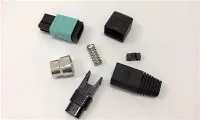
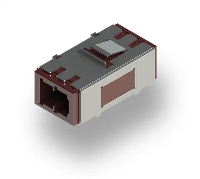
Upgrading fiber optic adapters in an existing network might seem like a daunting task, but it doesn't have to be. As a fiber optic adapter supplier, I've seen firsthand how a well - executed upgrade can significantly boost network performance. In this blog, I'll walk you through the steps to upgrade fiber optic adapters in your existing network.
Understanding the Need for Upgrade
First things first, you need to figure out why you're upgrading. There could be several reasons. Maybe your current adapters are outdated and can't keep up with the increasing data traffic. Or perhaps you're experiencing frequent signal losses or connection issues. Sometimes, it's just a matter of wanting to future - proof your network for upcoming technologies.
Take a close look at your network's performance metrics. Check for high bit - error rates, low signal strength, or slow data transfer speeds. If you notice any of these problems, it might be time to consider an upgrade.
Assessing Your Current Network
Before you start swapping out adapters, you need to have a clear picture of your existing network. Make a list of all the fiber optic adapters currently in use. Note down their types, such as Fiber Optic Sc Adapter, Fiber Optic Mpo Adapter, or Fiber Optic St Coupler. Also, find out the number of ports, their locations, and how they're connected.
Inspect the condition of the existing adapters. Look for signs of physical damage, like cracks, scratches, or bent pins. Damaged adapters can cause signal degradation and should be replaced as soon as possible.
Choosing the Right Adapters
Once you've assessed your current network, it's time to choose the right adapters for the upgrade. Consider the following factors:
Compatibility
The new adapters must be compatible with your existing fiber optic cables and network equipment. Check the connector types, such as SC, LC, ST, or MPO. Make sure the new adapters have the same connector type as the cables they'll be connected to.
Performance
Look for adapters that offer better performance than your current ones. This includes lower insertion loss, higher return loss, and better signal transmission. High - performance adapters can improve the overall efficiency of your network.
Future - Proofing
Think about the future needs of your network. Will you be adding more devices or increasing data traffic in the coming years? Choose adapters that can handle future growth and technological advancements.
Preparing for the Upgrade
Before you start the actual upgrade process, you need to do some preparation.
Gather Tools and Materials
You'll need a few tools for the upgrade, such as fiber optic cleaning kits, cable testers, and screwdrivers. Make sure you have all the necessary tools on hand before you begin.
Plan the Upgrade
Create a detailed plan for the upgrade. Decide which adapters will be replaced first, and in what order. This will help you minimize downtime and ensure a smooth transition.
Backup Your Data
It's always a good idea to back up your data before making any changes to your network. This will protect you in case something goes wrong during the upgrade.
Upgrading the Adapters
Now it's time to start the upgrade process.
Power Down the Network
Before you start working on the adapters, power down the network to avoid any electrical hazards. This includes turning off all servers, switches, and other network equipment.
Remove the Old Adapters
Carefully remove the old adapters from the network. Use a screwdriver if necessary, but be gentle to avoid damaging the surrounding components.
Clean the Connectors
Once the old adapters are removed, clean the fiber optic connectors using a cleaning kit. This will remove any dust, dirt, or debris that could affect the performance of the new adapters.
Install the New Adapters
Install the new adapters in the same locations as the old ones. Make sure they're properly aligned and securely fastened. Use a cable tester to check the connections and ensure they're working correctly.
Power Up the Network
After all the new adapters are installed and tested, power up the network. Check the network performance to make sure everything is working as expected.
Testing and Optimization
After the upgrade, it's important to test the network thoroughly. Use a network analyzer to check for any signal losses, errors, or other issues. If you find any problems, troubleshoot them immediately.
You may also need to optimize the network settings to take full advantage of the new adapters. This could include adjusting the transmission rates, signal strength, or other parameters.
Maintenance and Support
Once the upgrade is complete, regular maintenance is essential to keep your network running smoothly. Clean the adapters and connectors periodically to prevent dust and dirt buildup.
As a fiber optic adapter supplier, I offer ongoing support for all the products we sell. If you have any questions or need assistance with your network upgrade, don't hesitate to reach out.
Conclusion
Upgrading fiber optic adapters in an existing network is a complex but rewarding process. By following these steps, you can improve the performance of your network, increase its reliability, and future - proof it for upcoming technologies.


If you're interested in upgrading your fiber optic adapters or have any questions about our products, feel free to contact us for a consultation. We're here to help you make the best choices for your network.
References
- "Fiber Optic Communication Systems" by Govind P. Agrawal
- "Fiber Optics Installation and Troubleshooting" by Jeff Hecht