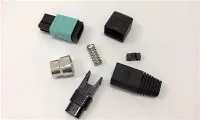
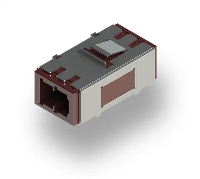
Hey there! As a supplier of Fiber Optic SC Connectors, I've seen my fair share of issues that customers run into. In this blog, I'm gonna walk you through how to troubleshoot problems with these connectors.
First off, let's understand what a Fiber Optic SC Connector is. It's a type of fiber optic connector that's widely used in telecommunications and data networks. The SC in its name stands for Subscriber Connector, and it's known for its push-pull coupling mechanism, which makes it easy to install and remove. You can check out more about it here: Fiber Optic SC Connector.
Common Problems and Their Causes
1. Low Signal Strength
One of the most common issues with Fiber Optic SC Connectors is low signal strength. This can be a real pain, especially when you're relying on a stable connection for important tasks. There are several reasons why this might happen.
- Dirty Connectors: Over time, dust, dirt, and other contaminants can build up on the connector end-faces. This can block the light signal, leading to a drop in signal strength. It's like having a smudge on your glasses - it makes it hard to see clearly.
- Mismatched Connectors: Sometimes, using connectors that aren't compatible with each other can cause problems. For example, if you mix an APC (Angled Physical Contact) connector with a UPC (Ultra Physical Contact) connector, the signal might not transfer properly.
- Bent or Damaged Fibers: If the fiber optic cable is bent too sharply or damaged in some way, it can cause signal loss. This is because the light signal can't travel through the fiber as efficiently when it's bent or broken.
2. Intermittent Connection
Another problem you might encounter is an intermittent connection. This means that the connection keeps dropping in and out, which can be really frustrating.
- Loose Connections: If the connector isn't properly seated in the adapter or socket, it can cause an intermittent connection. This could be due to a loose push-pull mechanism or a problem with the locking mechanism.
- Vibrations or Movements: In some environments, vibrations or movements can cause the connector to move slightly, leading to an intermittent connection. This is common in industrial settings or areas with a lot of foot traffic.
3. High Insertion Loss
Insertion loss refers to the amount of signal that's lost when the light travels through the connector. A high insertion loss can indicate a problem with the connector.
- Poor Polishing: If the connector end-faces aren't polished properly, it can cause a high insertion loss. This is because the rough surface can scatter the light signal, reducing its strength.
- Incorrect Alignment: When the fibers in the connector aren't aligned correctly, it can also lead to a high insertion loss. This can happen if the connector is installed incorrectly or if there's a problem with the adapter.
Troubleshooting Steps
1. Visual Inspection
The first step in troubleshooting any problem with a Fiber Optic SC Connector is to do a visual inspection. This can help you identify any obvious issues, such as dirt, damage, or loose connections.
- Check for Dirt and Contaminants: Use a fiber optic inspection microscope or a simple flashlight to look at the connector end-faces. If you see any dirt or contaminants, you can clean the connector using a fiber optic cleaning kit. These kits usually come with cleaning wipes or swabs that are specifically designed for cleaning fiber optic connectors.
- Look for Damage: Check the connector for any signs of damage, such as cracks, chips, or bent pins. If you find any damage, you'll need to replace the connector.
- Verify the Connection: Make sure the connector is properly seated in the adapter or socket. You can try gently pushing and pulling the connector to see if it's loose. If it is, try reinserting it and making sure it locks into place.
2. Cleaning the Connector
As I mentioned earlier, dirty connectors are a common cause of problems with Fiber Optic SC Connectors. Cleaning the connector can often solve the issue.
- Use a Cleaning Kit: There are several types of fiber optic cleaning kits available on the market. Make sure you choose a kit that's compatible with your connector. To clean the connector, simply follow the instructions provided with the kit. Usually, you'll need to wipe the end-face of the connector with a cleaning wipe or swab.
- Avoid Using Compressed Air: While compressed air might seem like a quick and easy way to clean the connector, it can actually cause more harm than good. Compressed air can blow dirt and debris deeper into the connector, making the problem worse.
3. Checking the Cable
If the visual inspection and cleaning don't solve the problem, the next step is to check the fiber optic cable.
- Look for Bends and Damage: Inspect the cable for any bends, kinks, or damage. If you find any, you'll need to replace the cable. Make sure to handle the cable carefully to avoid causing any further damage.
- Test the Cable: You can use a fiber optic cable tester to check the integrity of the cable. This will help you determine if there are any breaks or other issues with the cable.
4. Replacing the Connector
If all else fails, you might need to replace the Fiber Optic SC Connector. This is a relatively simple process, but it does require some basic tools and knowledge.
- Choose the Right Connector: Make sure you choose a connector that's compatible with your cable and the equipment you're using. You can find a wide range of Fiber Optic SC Connectors on our website, including the Fiber Optical Sm Sc Upc Fast Connector.
- Follow the Installation Instructions: When replacing the connector, make sure you follow the installation instructions carefully. This will ensure that the connector is installed correctly and that the connection is stable.
Other Related Connectors
While we're on the topic of fiber optic connectors, it's worth mentioning the Fiber Optic MU Connector. The MU connector is a smaller, more compact connector that's often used in high-density applications. It's similar to the SC connector in many ways, but it has a different coupling mechanism.
Conclusion
Troubleshooting problems with a Fiber Optic SC Connector can be a bit of a challenge, but with the right knowledge and tools, it's definitely doable. By following the steps outlined in this blog, you should be able to identify and solve most common problems with these connectors.
If you're having trouble with your Fiber Optic SC Connectors or if you're looking to purchase new ones, don't hesitate to get in touch. We're here to help you find the right solutions for your needs. Whether you're a small business or a large enterprise, we've got the products and expertise to support you.


References
- "Fiber Optic Connector Handbook" - A comprehensive guide to fiber optic connectors and their applications.
- Industry standards and specifications for fiber optic connectors.