Cleaning a dirty Fiber Optic E2000 Pigtail is a crucial maintenance task that ensures optimal performance and longevity of your fiber optic network. As a supplier of Fiber Optic E2000 Pigtails, I understand the importance of proper cleaning procedures. In this blog post, I'll share detailed steps and essential tips on how to clean a dirty Fiber Optic E2000 Pigtail.

Understanding the Fiber Optic E2000 Pigtail
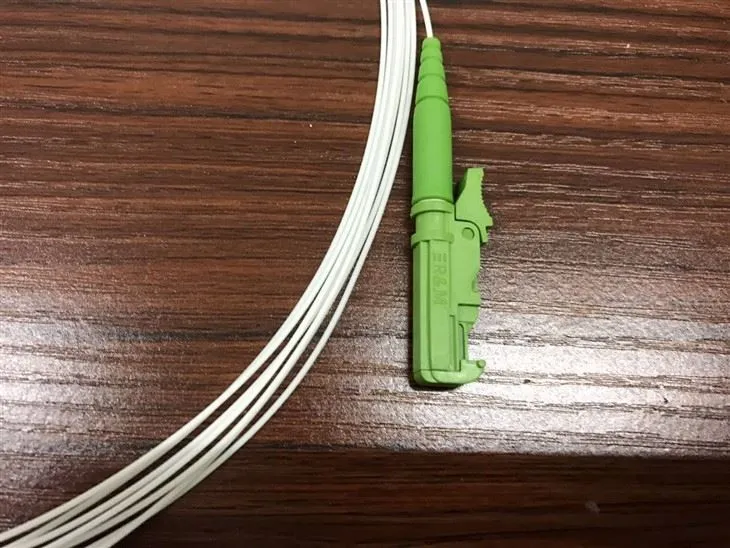
Before we delve into the cleaning process, let's briefly understand what a Fiber Optic E2000 Pigtail is. The E2000 connector is a high - performance connector designed for fiber optic applications. It features a shutter mechanism that protects the fiber end - face when not in use. A pigtail, on the other hand, is a short length of fiber optic cable with a connector on one end. The Fiber Optic E2000 Pigtail is widely used in data centers, telecommunications networks, and other high - speed communication systems.
Why Cleaning is Necessary
Dirt, dust, and other contaminants on the fiber end - face can cause significant signal loss and reflection. Even the smallest particle can disrupt the light transmission, leading to poor network performance, increased bit error rates, and potential system failures. Regular cleaning of Fiber Optic E2000 Pigtails helps maintain the integrity of the fiber optic link and ensures reliable data transmission.
Tools Required for Cleaning
- Fiber Optic Cleaning Kit: This typically includes lint - free cleaning wipes, cleaning swabs, and cleaning fluid. Make sure to use a cleaning fluid specifically designed for fiber optic connectors.
- Microscope or Inspection Scope: To visually inspect the fiber end - face before and after cleaning. This helps you ensure that the end - face is clean and free of contaminants.
- Compressed Air Canister: To blow away loose dust and debris from the connector and the cable.
Step - by - Step Cleaning Process
Step 1: Preparation
- First, ensure that the fiber optic network is powered off to avoid any potential damage to the equipment or injury to the user.
- Put on clean gloves to prevent transferring oils and dirt from your hands to the connector.
Step 2: Inspection
- Use a microscope or inspection scope to examine the fiber end - face of the E2000 pigtail. Look for any visible dirt, dust, scratches, or other contaminants. If the end - face is severely damaged, the pigtail may need to be replaced.
Step 3: Blowing Away Loose Debris
- Hold the pigtail by the cable, not the connector, to avoid damaging it.
- Use a compressed air canister to blow away any loose dust and debris from the connector. Hold the canister about 2 - 3 inches away from the connector and spray in short bursts.
Step 4: Cleaning the Connector
- Using Cleaning Wipes:
- Moisten a lint - free cleaning wipe with the appropriate cleaning fluid.
- Gently wipe the fiber end - face of the E2000 connector in a single, straight motion. Avoid circular or back - and - forth motions, as these can spread the contaminants.
- Repeat the wiping process 2 - 3 times if necessary.
- Using Cleaning Swabs:
- Dip a cleaning swab into the cleaning fluid.
- Insert the swab into the connector ferrule and rotate it gently a few times. Make sure the swab makes full contact with the fiber end - face.
- Remove the swab and discard it. Do not reuse the swab.
Step 5: Final Inspection
- After cleaning, use the microscope or inspection scope again to check the fiber end - face. It should be clean and free of any visible contaminants. If there are still some particles or smudges, repeat the cleaning process.
Tips for Effective Cleaning
- Clean in a Clean Environment: Perform the cleaning process in a clean, dust - free area to minimize the risk of re - contamination.
- Follow the Manufacturer's Instructions: Different cleaning products may have specific usage instructions. Make sure to read and follow them carefully.
- Regular Cleaning Schedule: Establish a regular cleaning schedule for your fiber optic network. This can help prevent the buildup of contaminants and ensure consistent performance.
Comparison with Other Pigtail Types
While the cleaning process for the Fiber Optic E2000 Pigtail is similar to other pigtail types, there are some differences. For example, the Fiber Optic St Pigtails have a bayonet - style connector, and the Fiber Optic Fc Pigtail has a screw - type connector. The cleaning tools and techniques may need to be adjusted slightly to accommodate the different connector designs. However, the basic principle of removing contaminants from the fiber end - face remains the same.
Conclusion
Proper cleaning of a dirty Fiber Optic E2000 Pigtail is essential for maintaining the performance and reliability of your fiber optic network. By following the steps and tips outlined in this blog post, you can ensure that your fiber optic pigtails are clean and functioning optimally.
As a leading supplier of Fiber Optic E2000 Pigtails, we are committed to providing high - quality products and comprehensive support to our customers. If you have any questions about cleaning, installation, or any other aspect of our fiber optic pigtails, please feel free to contact us. We are here to assist you in making the right choices for your fiber optic network needs. Whether you are a small business setting up a new network or a large enterprise looking to upgrade your existing infrastructure, we have the expertise and products to meet your requirements. Reach out to us today to start a discussion about your fiber optic pigtail procurement.
References
- "Fiber Optic Connector Cleaning Best Practices," Fiber Optic Association.
- "Optical Fiber Communication Systems," Gerd Keiser.