When setting up a fiber optic network, you'll encounter two essential components: fiber cables and fiber patch cords. While both transmit data using light signals, they serve very different purposes. This guide breaks down the key differences to help you choose the right product for your application.
Quick Answer: Fiber Cable vs Fiber Patch Cord
| Feature | Fiber Cable | Fiber Patch Cord |
|---|---|---|
| Length | Hundreds of meters to kilometers | 0.5m to 30m (typically) |
| Fiber Count | Multiple fibers (2 to 288+) | 1-2 fibers (simplex/duplex) |
| Connectors | Usually unterminated | Pre-terminated on both ends |
| Installation | Requires splicing | Plug-and-play |
| Use Case | Backbone infrastructure | Device-to-device connections |
| Environment | Indoor/outdoor, underground | Indoor (data centers, server rooms) |
In short: Fiber cables are the highways that carry data over long distances, while fiber patch cords are the on-ramps that connect your equipment to those highways.
What Is a Fiber Optic Cable?
A fiber optic cable (also called fiber trunk cable or bulk fiber cable) is a large-diameter cable containing multiple optical fibers bundled together. These cables form the backbone of telecommunications networks, connecting cities, buildings, and data centers over long distances.

Key Characteristics of Fiber Cables
Multi-fiber construction: Contains 2, 4, 6, 12, 24, 48, 96, 144, or even 288+ fiber strands
Heavy-duty protection: Features aramid yarn (Kevlar), armor, and thick outer jackets
Long transmission distance: Supports spans of 10km, 40km, or more depending on fiber type
Requires termination: Must be spliced to fiber optic pigtails or terminated with connectors before use
Indoor/outdoor options: Available in aerial, direct burial, and duct installation types
Common Applications
Long-haul telecommunications between cities
Metro area network (MAN) infrastructure
Campus backbone connections between buildings
FTTH (Fiber to the Home) distribution networks
Submarine cables for intercontinental communication
What Is a Fiber Optic Patch Cord?
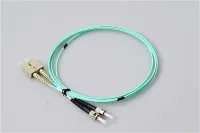
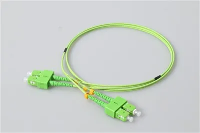
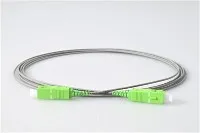
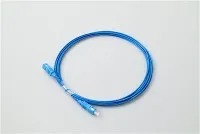
A fiber optic patch cord (also called fiber jumper, patch cable, or fiber optic patch cable) is a short, flexible cable with fiber optic connectors pre-installed on both ends. Patch cords provide plug-and-play connectivity between network devices.

Key Characteristics of Fiber Patch Cords
Pre-terminated: Factory-installed connectors on both ends (LC, SC, FC, ST, MU, MTP/MPO)
Short lengths: Typically 0.5m to 30m for indoor use
Simplex or duplex: Single fiber or dual fiber configurations
Lightweight and flexible: Easy to install, route, and manage
100% tested: Each patch cord is optically tested before shipping
Common Applications
Connecting servers to switches in data centers
Linking routers and switches in telecommunications rooms
Patching between fiber optic terminal boxes and equipment
Testing and troubleshooting fiber networks
FTTH indoor connections from ONT to wall outlet
Fiber Patch Cord vs Fiber Pigtail: What's the Difference?
Another common question is how patch cords differ from pigtails. Here's the simple answer:
| Component | Connectors | Main Use |
|---|---|---|
| Patch Cord | Both ends | Connect devices together |
| Pigtail | One end only | Splice to fiber cables |
A fiber optic pigtail has a connector on one end and bare fiber on the other. The bare end is fusion spliced to backbone cables, making pigtails essential for terminating fiber cables in distribution frames and terminal boxes.
Pro tip: You can cut one patch cord in half to create two pigtails-though purchasing dedicated pigtails is more cost-effective and ensures factory-quality termination.
Types of Fiber Patch Cords
Fiber patch cords come in various types based on fiber mode, connector style, and construction. Understanding these categories helps you select the right cable for your network.
By Fiber Mode
Single Mode Fiber Patch Cord (SMF)
Core diameter: 9μm
Jacket color: Yellow
Wavelength: 1310nm, 1550nm
Distance: Up to 10km (1310nm) or 40km+ (1550nm)
Best for: Long-distance transmission, telecommunications, CATV
Multimode Fiber Patch Cord (MMF)
Core diameter: 50μm or 62.5μm
Jacket color: Orange (OM1/OM2), Aqua (OM3/OM4), Lime Green (OM5)
Distance: 300m to 550m depending on speed
Best for: Data centers, LANs, short-distance high-speed links
| Fiber Type | Core Size | Max Distance (10G) | Jacket Color |
|---|---|---|---|
| OS2 (Single Mode) | 9μm | 10km+ | Yellow |
| OM1 | 62.5μm | 33m | Orange |
| OM2 | 50μm | 82m | Orange |
| OM3 | 50μm | 300m | Aqua |
| OM4 | 50μm | 400m | Aqua |
| OM5 | 50μm | 400m | Lime Green |
By Connector Type
Different equipment requires different connector interfaces. Here are the most common types:
LC Connector: Small form factor, latch locking, most popular for data centers
SC Connector: Push-pull design, widely used in FTTH and telecom
FC Connector: Screw-on, high vibration resistance, used in test equipment
ST Connector: Bayonet style, common in legacy multimode networks
MU Connector: Mini SC design, popular in DWDM and Japanese telecom
MTP/MPO Connector: Multi-fiber (8, 12, 24 fibers), used for 40G/100G/400G

By Polish Type
The connector end-face polish affects signal reflection:
| Polish Type | Return Loss | Connector Color | Best For |
|---|---|---|---|
| UPC | ≥50 dB | Blue | Ethernet, digital data |
| APC | ≥60 dB | Green | CATV, PON, analog signals |
Important: Never connect APC to UPC connectors-the angled vs flat surfaces will cause high loss and damage.
By Fiber Count
Simplex: Single fiber, one connector each end
Duplex: Two fibers, used for bidirectional communication (TX/RX)
Multi-fiber: 8, 12, or 24 fibers using MTP/MPO connectors
By Jacket Material
| Jacket Type | Fire Rating | Application |
|---|---|---|
| PVC | Standard | General indoor use |
| LSZH | Low smoke, zero halogen | Public buildings, transit |
| OFNR | Riser-rated | Vertical shafts between floors |
| OFNP | Plenum-rated | Air handling spaces, ducts |
How to Choose the Right Fiber Patch Cord
Follow this checklist when selecting fiber patch cords:

Step 1: Check Your Equipment Ports
Look at the transceiver or switch ports to identify the required connector type (LC, SC, etc.) and fiber mode (single mode or multimode).
Step 2: Determine the Distance
- Under 300m: Multimode (OM3/OM4) is cost-effective
- Over 300m: Single mode is required
- Over 10km: Single mode with APC polish recommended
Step 3: Match the Fiber Mode
- Single mode equipment → Yellow single mode patch cord
- Multimode equipment → Orange or aqua multimode patch cord
- Never mix single mode and multimode-the different core sizes make them incompatible.
Step 4: Select the Polish Type
Digital networks (Ethernet) → UPC (blue connector)
Analog/RF networks (CATV, PON) → APC (green connector)
Step 5: Choose the Right Length
Order appropriate lengths to avoid:
- Too short: Strain on connectors
- Too long: Excess cable, increased attenuation, clutter
- Standard lengths: 1m, 2m, 3m, 5m, 10m, 15m, 20m
Step 6: Consider the Environment
- Standard office/data center → PVC or LSZH
- Plenum spaces → OFNP required
- Riser shafts → OFNR required
Fiber Optic System Components: How They Work Together
A complete fiber optic network uses multiple components that work together:
Fiber Optic Cable – Carries signals over long distances
Fiber Optic Pigtail – Terminates cables via fusion splicing
Fiber Optic Adapter – Connects two patch cords together
Fiber Optic Patch Cord – Connects equipment to the network
Fiber Optic Terminal Box – Protects splices and provides patch points
PLC Splitter – Splits signals for PON/FTTH distribution
Frequently Asked Questions
What is the main difference between fiber cable and fiber patch cord?
Fiber cables are long, multi-fiber cables used for backbone infrastructure that require splicing for termination. Fiber patch cords are short, pre-terminated cables with connectors on both ends used to connect network equipment.
Can I use single mode patch cords with multimode equipment?
No. Single mode fiber (9μm core) and multimode fiber (50/62.5μm core) have different core sizes and operate at different wavelengths. Using mismatched cables will result in severe signal loss or no connection.
What does "simplex" and "duplex" mean for patch cords?
Simplex patch cords have one fiber strand for one-way transmission. Duplex patch cords have two fiber strands-one for transmit (TX) and one for receive (RX)-enabling bidirectional communication.
How long do fiber patch cords last?
Quality fiber patch cords are rated for 500-1000 mating cycles. With proper handling and cleaning, they can last 10+ years in typical environments.
Why are fiber patch cords different colors?
Color coding follows TIA-598 standards for easy identification:
Yellow = Single mode (OS1/OS2)
Orange = Multimode (OM1/OM2)
Aqua = Multimode (OM3/OM4)
Lime Green = Multimode (OM5)
What's the difference between a patch cord and a pigtail?
A patch cord has connectors on both ends and is ready to use. A pigtail has a connector on one end and bare fiber on the other-it must be spliced to complete the connection.
Conclusion
Understanding the difference between fiber cables and fiber patch cords is essential for designing and maintaining fiber optic networks:
Fiber cables form the long-distance backbone of your network
Fiber patch cords provide the flexible, plug-and-play connections between equipment
Fiber pigtails bridge the gap by splicing cables to connectorized components
When planning your network, consider factors like transmission distance, data speed requirements, connector compatibility, and installation environment to select the right components.
Related Products
Looking for quality fiber optic connectivity solutions? Explore our product range:
Fiber Optic Patch Cords – LC, SC, FC, ST, MU, MTP/MPO
Fiber Optic Pigtails – For fusion splice termination
Fiber Optic Connectors – Precision ceramic ferrules
Fiber Optic Adapters – All connector combinations
PLC Splitters – 1×2 to 1×64 for PON networks
Fiber Optic Terminal Boxes – Wall and rack mount options
Contact us for custom solutions and OEM services.