Here's something most networking guides won't tell you upfront: crossover cables are almost obsolete. Nearly every Ethernet device manufactured after 2004 supports Auto-MDI/X - a feature that automatically detects the cable type and adjusts its transmit/receive pairs accordingly. Plug a straight-through patch cable into two switches, two PCs, or any combination, and the ports sort themselves out.
So why write about crossover cables in 2026? Because "almost obsolete" isn't "completely obsolete." Legacy industrial equipment, older managed switches with Auto-MDI/X disabled, and certain embedded systems still require manual crossover wiring. And more importantly, understanding why crossover cables exist teaches you how Ethernet actually works at the physical layer - knowledge that matters when you're troubleshooting a link that won't come up at 3 AM.
T-568A vs. T-568B: The Wiring Standards Behind Every Ethernet Cable
Every copper Ethernet cable terminates in an RJ-45 connector with 8 pins. The two recognized wiring standards - T-568A and T-568B - define which colored wire goes to which pin:
|
Pin |
T-568A |
T-568B |
|
1 |
White/Green |
White/Orange |
|
2 |
Green |
Orange |
|
3 |
White/Orange |
White/Green |
|
4 |
Blue |
Blue |
|
5 |
White/Blue |
White/Blue |
|
6 |
Orange |
Green |
|
7 |
White/Brown |
White/Brown |
|
8 |
Brown |
Brown |
The critical difference: pins 1-2 and 3-6 are swapped between the two standards. These are the transmit (TX) and receive (RX) pairs for 10/100BASE-T Ethernet. This swap is the entire basis for how patch cables and crossover cables differ.
Which standard should you use? In the United States, T-568B is dominant in commercial installations. T-568A is more common in residential and government wiring (it's compatible with older USOC telephone wiring). Pick one and use it consistently throughout your facility. Mixing standards within a single cable plant creates confusion and troubleshooting headaches.
What Is a Patch Cable (Straight-Through)?
A patch cable - also called a straight-through cable - has both ends terminated to the same standard: both T-568A, or both T-568B. Pin 1 on one end connects to Pin 1 on the other. Pin 2 to Pin 2. Straight through, every wire.
This is the cable you use for the vast majority of Ethernet connections:
Computer → Switch
Switch → Router
Router → Modem
Access point → Switch
IP phone → Switch
Any device → Patch panel port
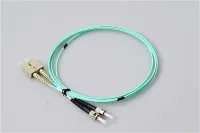
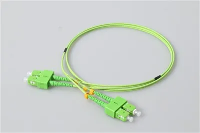
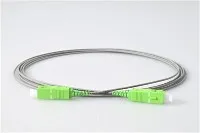
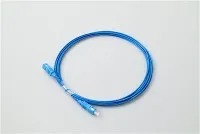
Patch cables come in copper (Cat5e, Cat6, Cat6a, Cat8) and fiber optic varieties. On the copper side, these are the workhorse cables of every network. On the fiber side, fiber optic patch cords serve the same function - connecting equipment to equipment or equipment to patch panels - using light instead of electrical signals.
What Is a Crossover Cable?
A crossover cable has one end wired to T-568A and the other to T-568B. This intentionally crosses the transmit pair on one end to the receive pair on the other, allowing two like devices to communicate directly without an intermediary switch.
The wiring looks like this:
|
Function |
End A (T-568A) |
End B (T-568B) |
|
TX+ |
Pin 1 (White/Green) |
→ Pin 3 (White/Green) |
|
TX- |
Pin 2 (Green) |
→ Pin 6 (Green) |
|
RX+ |
Pin 3 (White/Orange) |
→ Pin 1 (White/Orange) |
|
RX- |
Pin 6 (Orange) |
→ Pin 2 (Orange) |
Traditional use cases for crossover cables:
Computer → Computer (direct file transfer)
Switch → Switch (uplink without dedicated uplink port)
Router → Router
Hub → Hub
I say "traditional" because these scenarios assumed the equipment couldn't auto-detect the cable type. Modern equipment can.
Auto-MDI/X: Why Crossover Cables Are (Mostly) Dead
Auto-MDI/X (IEEE 802.3ab, originally introduced with Gigabit Ethernet) lets an Ethernet port automatically detect whether it's connected to an MDI or MDI-X device and configure its pin assignments accordingly. A Gigabit Ethernet port doesn't care whether you plug in a straight-through cable or a crossover - it figures out the mapping on its own.
Here's what happened to the industry:
Pre-2000: Auto-MDI/X rare. Crossover cables essential for device-to-device connections.
2000–2005: Gigabit Ethernet adoption accelerated Auto-MDI/X support. Some managed switches still defaulted to manual MDI/X.
2005–present: Virtually every managed and unmanaged switch, router, NIC, and access point ships with Auto-MDI/X enabled by default. Crossover cables became unnecessary for 99% of installations.
But here's the catch: some industrial Ethernet equipment - PLCs, SCADA controllers, embedded sensor gateways - still uses 10/100BASE-T interfaces without Auto-MDI/X. In manufacturing plants and OT (Operational Technology) environments, a crossover cable in your tool bag still earns its keep. I've been called to factory floors where a brand-new Cisco switch couldn't talk to a 15-year-old Allen-Bradley PLC because the tech used a straight-through cable and the PLC's Ethernet port expected a crossover. Ten-dollar cable, two-hour troubleshoot.
Copper Patch Cables: Cat5e vs. Cat6 vs. Cat6a
Since patch cables are what you'll actually buy 99% of the time, here's the comparison that matters for purchasing decisions:
|
Category |
Max Speed |
Max Bandwidth |
Max Length (channel) |
Shielding |
Best For |
|
Cat5e |
1 Gbps |
100 MHz |
100 m |
UTP (unshielded) |
Basic Gigabit, legacy |
|
Cat6 |
10 Gbps |
250 MHz |
55 m (at 10G) / 100 m (at 1G) |
UTP or STP |
Standard enterprise |
|
Cat6a |
10 Gbps |
500 MHz |
100 m (at 10G) |
STP or F/UTP |
10G enterprise, PoE++, new builds |
|
Cat8 |
25/40 Gbps |
2,000 MHz |
30 m |
S/FTP (shielded) |
Short data center switch-to-switch |
The practical recommendation: For new installations, Cat6a is the standard. It's the only copper category that supports full 10 Gigabit Ethernet over the standard 100-meter channel distance. Cat6 works for 10G but only to 55 meters - which creates awkward limits in larger buildings. Cat5e is a legacy grade; it handles Gigabit fine but can't support 10G at all.
For runs that exceed copper's 100-meter limit, or where electromagnetic interference is a concern, fiber optic patch cords with LC or SC connectors take over. Fiber has no EMI sensitivity, supports distances from hundreds of meters to tens of kilometers, and scales from 1G to 400G with transceiver changes alone.
Fiber Optic Patch Cables: The Other Half of the Story
Most "patch cable vs. crossover cable" articles only cover copper. But in data centers, campuses, and inter-building links, fiber optic patch cables are equally - sometimes more - important.
Fiber patch cords are inherently "straight-through." There's no TX/RX crossover issue because fiber uses separate strands for transmit and receive (duplex cable), and the cross happens inside the switch or transceiver, not in the cable. You'll never need a "crossover fiber cable."
Key fiber patch cord specs to know:
|
Parameter |
Single-Mode (OS2) |
Multimode (OM3/OM4/OM5) |
|
Core diameter |
9 µm |
50 µm |
|
Typical connector |
LC, SC (APC or UPC) |
LC, MPO (UPC) |
|
Max reach (depends on optics) |
2 km – 80+ km |
70 – 400 m |
|
Color code |
Yellow (cable), Blue/Green (connector) |
Aqua/Lime green (cable), Beige (connector) |
|
Best for |
Long runs, WDM, PON, FTTH |
Data center, short-haul, high-density |
For projects involving PLC splitters, FTTH drops, or data center structured cabling, choosing the right fiber optic connector type and polish (APC vs. UPC) is critical. See our SC APC connector guide for details on when angled polish is required.
How to Tell a Patch Cable from a Crossover Cable
No label on the cable? Hold both RJ-45 connectors side by side with the clips facing away from you and compare the wire color order:
Same color sequence on both ends → Straight-through (patch cable)
Pins 1-2 and 3-6 colors swapped between ends → Crossover cable
If you can't visually inspect (the cable is in a wall or ceiling), use a simple cable tester. Any sub-$20 Ethernet tester will show whether the pin mapping is straight or crossed. It's a 5-second test that prevents 2-hour troubleshoots.
Frequently Asked Questions
Q: Do I Need A Crossover Cable To Connect Two Computers Directly?
A: On modern hardware (anything made after roughly 2005), no. Both computers' Gigabit NICs support Auto-MDI/X and will negotiate correctly with a standard patch cable. On very old 10/100 Mbps NICs without Auto-MDI/X, you'll need a crossover cable - or you can configure a software bridge/ad-hoc network instead.
Q: Can I Use A Crossover Cable As A Regular Patch Cable?
A: Yes - on any device with Auto-MDI/X (which is nearly everything today). The port detects the crossed wiring and adjusts. You won't notice any performance difference. However, using crossover cables as general patch cables creates labeling confusion, so it's better to standardize on straight-through.
Q: Does Cable Category (Cat5e/6/6a) Affect Whether I Need Crossover?
A: No. The crossover/straight-through distinction is about pin wiring order, not cable category. A Cat6a crossover cable and a Cat5e crossover cable both cross pins 1-2 with 3-6. The category rating affects bandwidth, speed, and shielding - not the TX/RX configuration.
Q: When Would I Still Need A Crossover Cable In 2026?
A: Legacy industrial equipment (PLCs, RTUs, SCADA gateways) with 10/100BASE-T ports that lack Auto-MDI/X. Some older managed switches where Auto-MDI/X has been manually disabled. And certain serial-to-Ethernet converters or embedded systems with fixed MDI pin assignments. If you work in manufacturing, oil/gas, or utilities, keep a crossover cable in your kit.
Q: Where Can I Source Quality Patch Cords - Both Copper And Fiber?
A: Evolux Fiber manufactures fiber optic patch cords (LC, SC, MPO, MTP), fiber connectors, and PLC splitters with custom lengths and OEM options. Every unit is factory-tested for insertion loss and return loss. Contact our team for volume pricing and free samples.