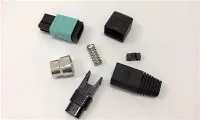
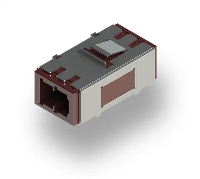
Hey there, folks! If you're in the market for high - quality fiber optic equipment, you've come to the right place. I'm a supplier of Fiber Optic ST Couplers, and today I'm gonna walk you through the process of installing one.
First things first, let's talk a bit about what a Fiber Optic ST Coupler is. It's a crucial component in fiber optic networks. It's used to connect two fiber optic cables together, allowing the seamless transmission of light signals. Think of it as a bridge that helps data travel from one cable to another.
Now, why would you want to use a Fiber Optic ST Coupler? Well, they're reliable, easy to install, and offer a good connection. They're commonly used in local area networks (LANs), data centers, and telecommunications.


Before we start the installation process, you'll need a few tools and materials. You'll need the Fiber Optic ST Coupler itself, of course. You can check out our Fiber Optic St Coupler on our website for a top - notch product. You'll also need two fiber optic cables with ST connectors, a fiber optic cleaner, and a pair of gloves to prevent any dirt or oils from getting on the connectors.
Let's get started with the installation.
Step 1: Prepare the Work Area
Find a clean, well - lit area to work in. A dirty environment can cause dust and debris to get into the fiber optic connectors, which can lead to signal loss. Make sure you have enough space to lay out all your tools and materials.
Step 2: Clean the Connectors
Put on your gloves to keep your hands clean. Take the fiber optic cleaner and gently clean the ends of the ST connectors on both fiber optic cables. Cleaning is super important because even the tiniest speck of dust can disrupt the light signal.
Step 3: Inspect the Coupler
Take a close look at the Fiber Optic ST Coupler. Make sure there are no visible cracks or damage. Check the alignment sleeves inside the coupler. They should be clean and free of any debris. If you notice any issues, don't use the coupler; get a new one.
Step 4: Insert the Connectors
Hold the Fiber Optic ST Coupler in one hand. Take one of the fiber optic cables with the ST connector and insert it into one end of the coupler. You'll feel a slight click when it's properly seated. Then, take the other fiber optic cable and insert its ST connector into the other end of the coupler. Again, you should hear that click, which means the connectors are securely in place.
Step 5: Check the Connection
Once both connectors are inserted, give the cables a gentle tug to make sure they're firmly connected. You don't want them to come loose easily. If the connectors seem wobbly, remove them and re - insert them.
Step 6: Test the Connection
After installation, it's time to test the connection. You can use a fiber optic power meter and a light source. Connect the light source to one end of the cable and the power meter to the other end. Check the power reading on the meter. If the reading is within the expected range, then your connection is good. If not, double - check the installation and make sure everything is properly connected.
Now, while the Fiber Optic ST Coupler is great, we also offer other types of fiber optic adapters. For example, our Fiber Optic Sc Adapter is another popular choice. It has a different design but serves a similar purpose of connecting fiber optic cables. And if you're looking for something more advanced, our Mtp®/mpo - 8/12/24 Black Fiber Optic Adapter/coupler with Flange, Key Up To Down is a high - performance option suitable for large - scale networks.
If you're having any trouble with the installation or if you're interested in purchasing our fiber optic products, don't hesitate to reach out. We're here to help you with all your fiber optic needs. Whether you're a small business setting up a local network or a large data center looking for reliable components, we've got you covered.
In conclusion, installing a Fiber Optic ST Coupler isn't that difficult if you follow these steps. With a little bit of care and attention, you can have a solid connection that will keep your data flowing smoothly. So, why wait? Check out our products and start building your fiber optic network today.
References
- Fiber Optic Association Handbook
- Industry standards for fiber optic installation and testing